
Mekai UI · · 5 min read
Copy-paste components vs a UI library: sizes, updates, trade-offs
Owning component source or installing an npm package: measured gzip sizes of real builds, how updates and fixes reach you, and a three-question decision rule.
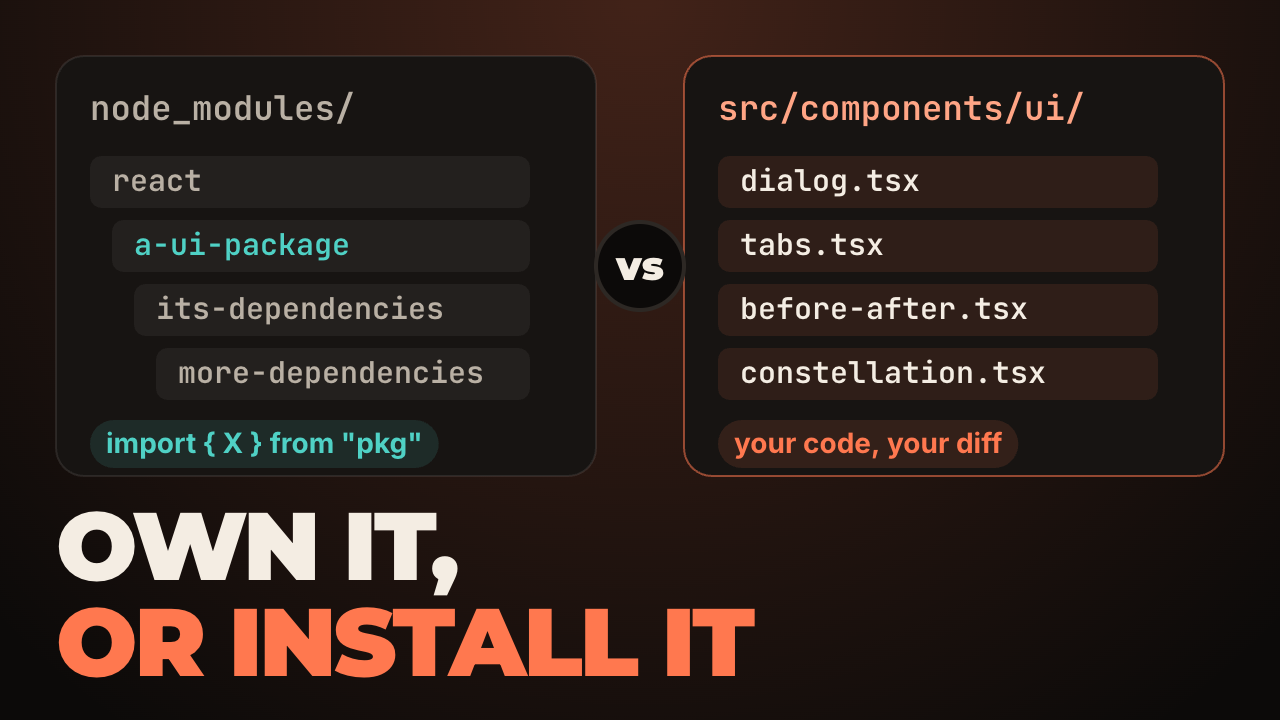
What is the difference between copy-paste components and a UI library?
A UI library is an npm package: you install it, import from it and update it by changing a version number. Copy-paste components put the source file in your own repository: you edit it like any other file and there is no version to bump. The shadcn/ui documentation describes itself as the second kind, code you copy in instead of a package you install.
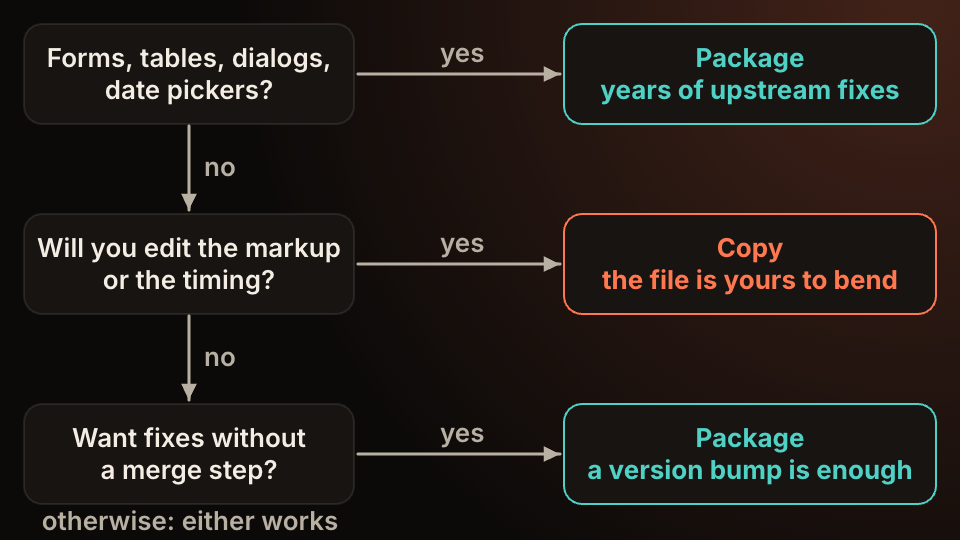
Neither one is better in general. The choice moves three costs around: who fixes bugs, who can change the markup, and how much code you review. This article puts numbers on the bundle size, which is the cost people argue about most, and then covers the other two.
How much does each add to your bundle?
Less than the debate suggests. Bundlers ship the code you import, whether it came from node_modules or from your own folder. Motion's own bundle size guide makes the same point about package size tools that count a whole library.
To get real numbers, one Vite project was built five times with free Mekai UI components installed from the registry. The empty React 19 app is 67.0 KB of gzipped JavaScript. Before After adds 2.3 KB. Constellation and Highlighter Text together add 3.7 KB. Aurora adds 44.0 KB, and the reason is not Aurora itself: it uses Motion's motion component, which brings in most of the Motion runtime.
Those are single builds on one machine, with Vite 8, React 19.3.1 and Motion 14.10.1, sizes in KB of 1024 bytes. They are the right order of magnitude, not a promise for your app.
Is a copied component smaller than the same feature from a package?
Sometimes slightly, and that is not a reason to choose it. For a before and after slider, the code of the copied Before After component is 2.5 KB gzipped, minified, with React and Motion left out. The whole react-compare-slider 4.0.0 package, measured the same way, is 3.3 KB. The two do not do the same things, so the gap says little.
What the numbers do show is the shape of the cost. The 53 free Mekai UI components have a median of 1.2 KB of their own code, and the largest is 2.9 KB. The real cost is the 39 of them that use Motion's motion components: about 45.7 KB gzipped, paid once per app, whichever of them you add. Using only the useReducedMotion hook costs about 0.25 KB.
Motion documents a way down: its m component with LazyMotion brings the initial cost to a little over 5 KB, according to its guide. Components copied into your repo can be changed to use it. A packaged component usually cannot.
Who handles updates and bug fixes?
With a package, a fix reaches you when you bump the version, and a changelog tells you what else changed. Your own code is untouched, which is what makes this the better setup for a large team.
With copied files the fix is yours to bring in. The shadcn CLI helps: add --diff prints what would change in a file, and --overwrite replaces it (install walkthrough). If you edited the file, you merge by hand. If you never open the file, you may never learn that a fix exists.
That last point is the cost to weigh. Ten copied files that you never touch are cheap. Forty that you edited are a small library you now maintain.
When is a package library the better choice?
Pick the package when the component is hard to get right and you do not need to change it. Date pickers, data tables, comboboxes and dialogs carry years of keyboard, screen reader and edge case fixes that you inherit with every update.
Pick it too when many people work in the codebase, when you need updates to arrive through a lockfile and a pull request, or when the library offers theming through props and tokens that already covers your design. These components are React only, so a different framework needs a different library anyway.
A copied component is only as good as the copy you have. Treat any accessibility claim the same way for both kinds: test it with a keyboard and a screen reader in your own app.
When are copy-paste components the better choice?
When the component is mostly look and motion, and you will want to change it: a hero background, a text effect, a card that tilts. Nobody finds a bug fix for a gradient headline urgent, but everybody wants to change its timing. For that, a file you own beats a prop you have to wait for.
It also fits when you need three components out of a hundred. You install three files and nothing else. The mistake is the opposite one: copying forty components "just in case". Each one is code your team now reviews and updates.
Mekai UI uses this model. The 53 free components are MIT licensed and live in the Mekai UI repository on GitHub; a star there tells us the free set is worth growing and helps other developers find it. Whichever model you pick, check the reduced motion handling of animated components and the cost of animated hero backgrounds before you ship them.
Questions people ask
- Do copy-paste components make my bundle smaller?
- Not by themselves. Bundlers ship what you import from either place. In the builds measured here, the choice of runtime mattered much more: components using Motion's
motioncomponent added about 44 KB gzip, while the ones using only a hook added under 4 KB. - Can I mix a UI package and copied components in one app?
- Yes, and many projects do. Use the package for complex widgets such as tables and date pickers, and copied files for visual effects you want to tune. Keep colors in CSS variables so both follow the same theme.
- How do I know when a copied component has an update?
- The registry does not notify you. Watch the release notes or the repository, then run the add command with
--diffon the file to see the change before you overwrite anything.