
Mekai UI · · 7 min read
Animated React hero backgrounds without hurting LCP, measured
Canvas, WebGL or CSS behind a React hero: measured LCP, main thread cost, lazy loading and offscreen pausing in a Vite production build, method included.
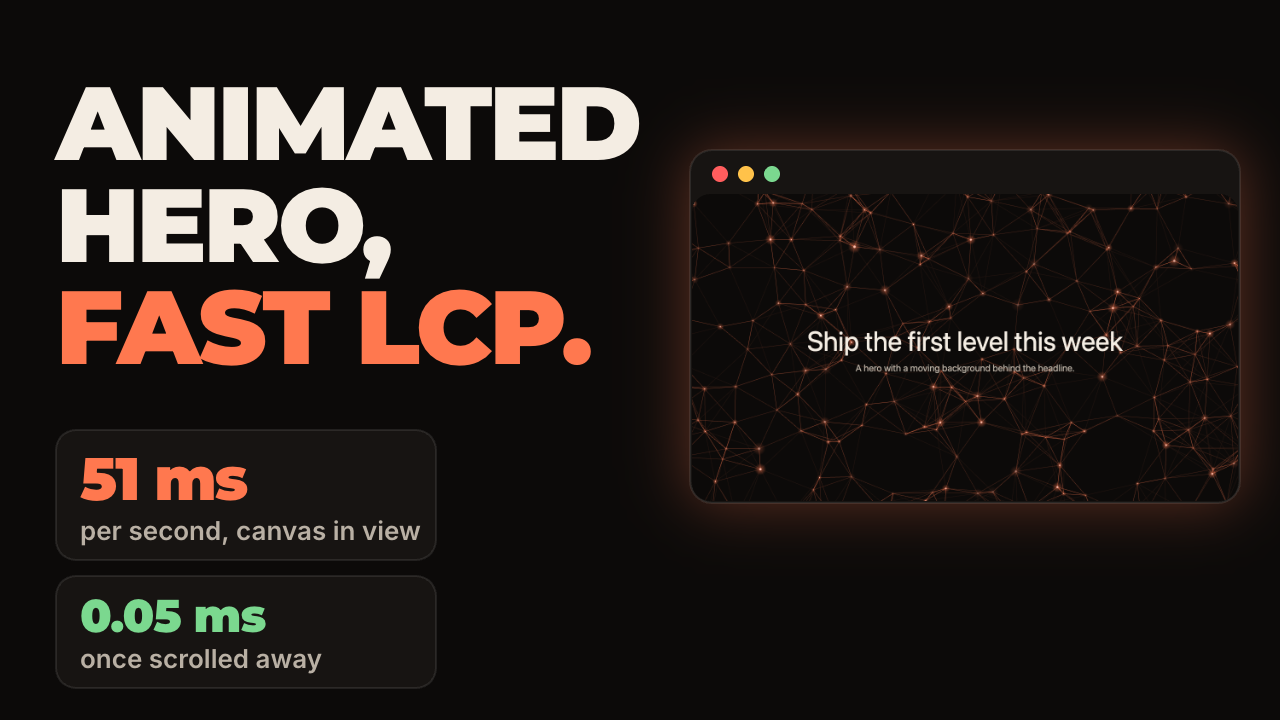
Does an animated hero background hurt LCP?
Not by itself. A <canvas> is not on the list of elements that can be the largest contentful paint, which is images, video posters, background images, and blocks of text, so the background never becomes the LCP element. In a production build on one Mac, the headline's LCP was 68 ms with no background and between 72 and 80 ms with a WebGL or canvas background. That gap is inside the run to run noise. The DOM background (Aurora) was the highest at 96 ms, about 28 ms above the page with no background, in two separate sets of runs. The cause was not investigated.
What does hurt is everything around it. The background's JavaScript has to download and run before a client rendered headline can paint, and a loop that runs forever keeps the main thread busy after load. The rest of this article measures both, and shows the one change that moved LCP in the tests: loading the background with React.lazy instead of a static import.
LCP thresholds, per web.dev: 2.5 seconds or less is good, over 4 seconds is poor, judged at the 75th percentile of real visits. The numbers below come from a local machine, not from field data, so use them to compare options and not as scores.
To set up the background itself in Next.js, follow the animated hero background guide on the Mekai UI site. This article is about what it costs and how to measure it.
Which kind of background costs the least to run?
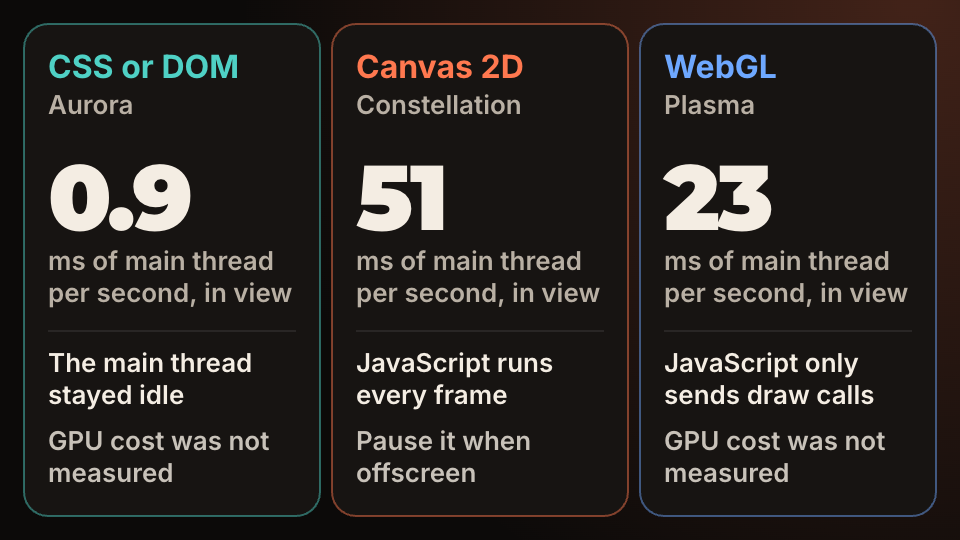
Measured as main thread work per second with the hero in view and the page idle, on a 1280 by 720 window: the DOM and CSS background (Aurora) used 0.89 ms, the WebGL background (Plasma) used 23 ms, and the canvas 2D background (Constellation) used 51 ms. Plasma varied from 10 to 27 ms between runs, so read it as "a fraction of the canvas". Under a 4x CPU slowdown, which is a rough stand in for a mid range phone, Constellation rose to 170 ms per second.
These are costs on the main thread. GPU time and battery were not measured, so a WebGL background that looks cheap here can still be expensive on a phone, and a DOM background with large blurred layers can be expensive to composite. Check your own target devices.
The same order showed up on the component pages of the local production build of Mekai UI, where the preview is larger and the page has its own content: 82 ms per second for Constellation, 47 for Plasma and 1.0 for Aurora, medians of 5 runs.
How do you load the background without delaying the headline?
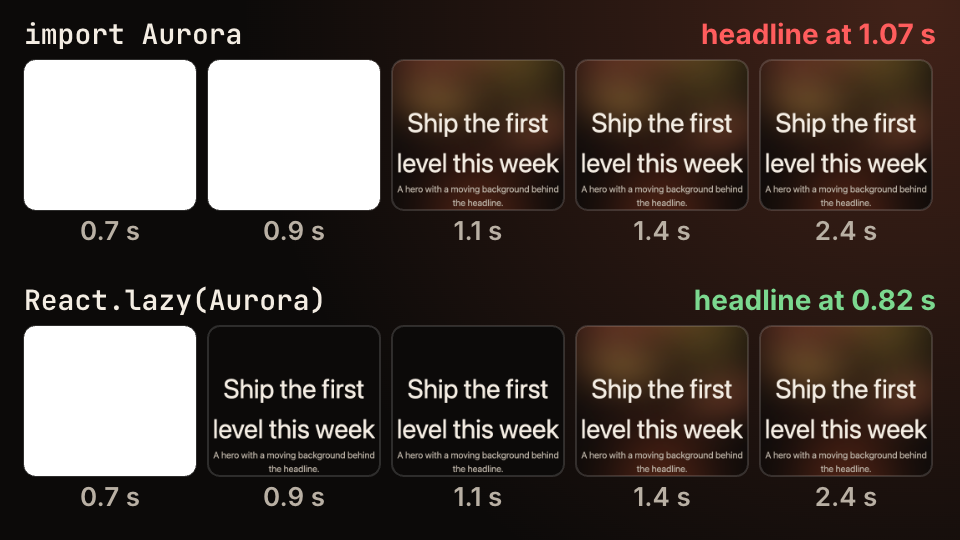
Make the background a separate chunk and load it after the headline. The test used one hero with Aurora, built twice with Vite: once with a static import, once with React.lazy. Network throttled to 1.6 Mbit/s with 150 ms latency, CPU slowed 4x, cold cache, 9 runs each. The static import gave an LCP of 1.07 s. With React.lazy it was 0.82 s, against 0.81 s for the same page with no background at all.
The reason is plain: Aurora brings in Motion's motion component, so the static import made the first script about 44 KB larger on the wire, and the client rendered headline waited for it. Total bytes downloaded were about the same (120 KB eager, 122 KB lazy). Only the order changed. The size of each component is in copy-paste components vs a UI library.
In Next.js, put the background in a Client Component and load it with next/dynamic. Its lazy loading guide says ssr: false must live in a Client Component. If the headline is already in the server rendered HTML, the lazy import protects interactivity rather than LCP, so measure before you assume a gain.
const Aurora = lazy(() => import("@/components/ui/aurora").then((m) => ({ default: m.Aurora })));

<section className="relative">
	<Suspense fallback={null}><Aurora /></Suspense>
	<h1>Ship the first level this week</h1>
</section>
How do you stop a background from running when nobody sees it?
Pause the loop when the element leaves the viewport. requestAnimationFrame already pauses in background tabs, but MDN does not say it stops for elements scrolled out of view, so use an IntersectionObserver. Constellation does exactly this: when its canvas is off screen it stops asking for frames, and it restarts when the canvas returns.
To see what that is worth, a copy of the same component with that one line changed (visible = true) was scrolled away from the same way. Constellation went to 0.05 ms of main thread work per second. The copy without the pause stayed at 51 ms. A hero is only in view for the first screen, so the saving is for the rest of the visit.
What about reduced motion and low power?
Stop the loop for visitors who asked for less motion. With prefers-reduced-motion: reduce emulated, all three backgrounds dropped to about 0.09 ms per second (and to 0.19 ms on the Mekai UI component page), because their loops and animations stop. That is the cheapest background there is, and for these visitors it is the right one. The code and the checks are in prefers-reduced-motion in React.
For battery, also think about size: the canvas in Constellation is capped at a device pixel ratio of 2, and it keeps the point density constant, so a phone is not drawing a web of lines meant for a 4K monitor.
How was this measured, and what are the limits?
Everything was run on one Apple M2 Pro Mac with macOS 26.5 and Google Chrome 156, driven by Puppeteer in headless mode. The components are the free Mekai UI ones, installed from the registry of the local production build (see install shadcn registry components) into a new Vite 8 project with React 19.3.1 and Motion 14.10.1, then built with vite build and served with vite preview.
- Each run used a fresh browser context with a cold cache. Numbers are medians: 7 runs for CPU, 9 for the throttled LCP test, 5 for the component pages of the Mekai UI build.
- LCP and long tasks come from
PerformanceObserver. Main thread work is the growth ofTaskDurationfrom Chrome'sPerformance.getMetricsover a 5 second window with the page idle. - Other work was running on the machine at the same time. A single run of Constellation ranged from 46 to 75 ms per second, so treat every number as approximate and trust the ratios.
- LCP values of 60 to 100 ms are small because the page is local and tiny. They compare options. They are not what visitors will get.
Checklist for a moving hero
In order of what moved the numbers: load the background after the headline, pause it offscreen, stop it for reduced motion, and keep the canvas count and size down.
The backgrounds used here come from Mekai UI, which has seven new ones in this release. The free ones are MIT licensed in the GitHub repository; a star there tells us this kind of write up is useful and helps other developers find the code.
- Is the background a lazy chunk, or is its code in the first script?
- Does the loop stop when the hero is offscreen and when the tab is hidden?
- Does it draw one still frame with reduced motion on?
- Did you check LCP and total blocking time with throttling on a real mid range phone?
Questions people ask
- Does a canvas count as the LCP element?
- No. web.dev lists images, video posters, elements with a background image and blocks of text as LCP candidates, and a canvas is not among them. A canvas can still delay LCP indirectly, through the JavaScript and main thread work around it.
- Is WebGL always cheaper than canvas 2D?
- On the main thread it was here: 23 ms against 51 ms per second. GPU time and battery were not measured, so test on the phones you care about.
- Should the hero background be a video instead?
- A video poster can become the LCP element, so it needs to be small and preloaded. A generated background has no file to load but costs CPU. Pick by what you can measure on your own page.