
Steam guide · · 7 min read
Steam Next Fest demo guide: deadlines, rules and prep
Steam Next Fest dates, deadlines and rules checked in November 2026, plus how to set up the demo, trailer and livestream, and what to do during the week.
When is the next Steam Next Fest, and what are the deadlines?
As of November 2026 the next Steam Next Fest runs from 22 February to 1 March 2027, and you have to register by 10 January 2027, 11:59 pm Pacific. The one after that is 14 to 21 June 2027 with registration closing on 25 April 2027. Valve says the fest runs three times a year, in February, June and October, and each edition has its own page with its own dates, so check that page before you plan.
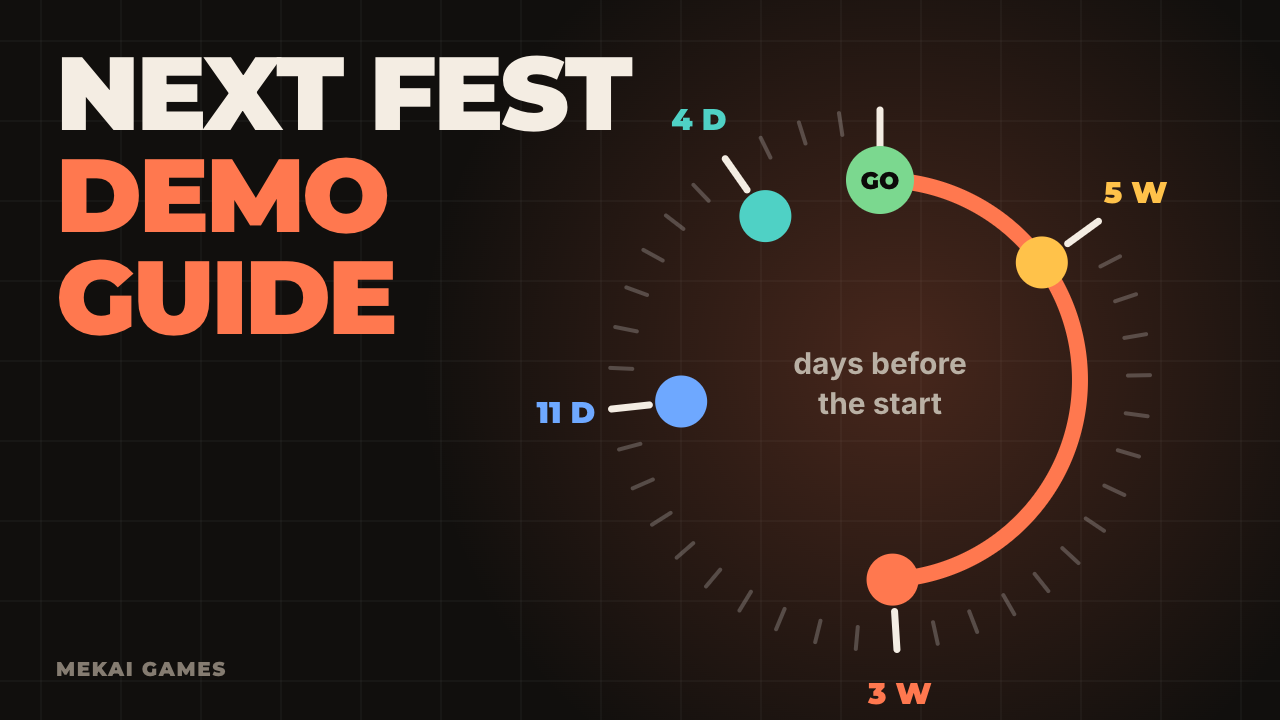
Registration is not the deadline that hurts. Valve's February page asks for your demo build and store page to be in review by 18 January if you want the demo live for Press Preview, and for everything to be in review by 1 February at the latest. From today, 8 November, that is 85 days. The general rule on Valve's rules page is to submit the demo build three weeks before the start, or five weeks if the press should see it, because review has to finish and any feedback has to be fixed.
All times are Pacific. The fest starts at 10:00 am, and your demo has to be live before then or you are out of the placement. The animation draws the February schedule to scale.
Can your game join Next Fest?
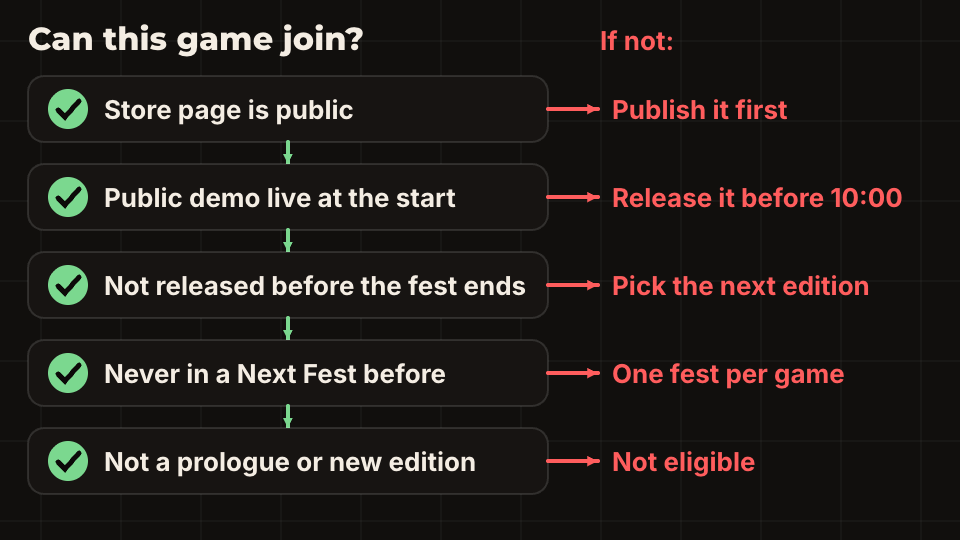
Your game can join if the base game's store page is public, a public demo is live when the fest begins, and the game is not released before that edition ends. Early Access and free-to-play games are fine as long as they are unreleased. Your Steamworks accounts also have to be in good standing.
The rule people miss is that a title can join one Next Fest, once. If your game has been in an edition before, it cannot come back. Prologues, previews, short versions of a released game, re-releases and new editions of an existing Steam game are not eligible either. You register from the base game, not the demo, and a green check mark on the app landing page tells you it worked.
Valve's February 2027 page says games may take part regardless of release date, but also lists a release date after 1 March 2027 in the requirements. The two lines do not agree, so read your own registration page before you rely on either.
Because you only get one slot, do not spend it on a rough build. Our rule: join when the store page is finished and the demo is something you would let a stranger play without you in the room. That is our advice, not Valve's.
How do you set up a demo for Next Fest?
A demo is its own app with its own app ID, of type Demo, linked to the base game's ID. On the base game's landing page open All associated packages, DLC, demos and tools and click Add Demo. It needs depots and a build like any app, so uploading a build with steamcmd applies to the demo too, with the demo's app ID in the script.
You can give the demo its own store page or only show demo assets on the base page. A separate page must describe only what the demo has, carry its own trailer and at least five screenshots, use capsules that say it is a demo, and have an accurate Content Survey. Build review checks that the features you promise exist and that the game runs. It is not a full test pass, and updates after approval are not reviewed again.
The order in the animation matters. Release the demo at least 30 minutes before the fest starts, then add its app ID under Special Settings and Associated Demos on the base page, and republish the base page. Valve notes that the Download Demo button only appears after you republish. Forgetting that last step is the easy way to start the fest with no button.
One more catch: a demo released early is playable by everyone, press included. If the demo is ready weeks ahead and you do not want that, hold the release button, not the review.
How long should the demo be, and what goes in it?
Valve sets no length for a Next Fest demo. We use one rule: end it where a player has seen the core loop and wants more. Our own GRAVENTH demo ends after its first boss, The Heart Hoarder. That is a design choice, not a Valve number.
What Valve does recommend is practical. Put a feedback link in the main menu or pause menu, pointing to a Steam sub-forum, Discord or bug tracker. Say on the demo's home screen whether and when you will take it down after the fest. Create a feedback sub-forum in your game's discussions, because demos do not get their own community hub.
Achievements are best left off in a demo. Valve suggests saving progress to shared Steam Cloud and granting the achievements when the full game loads, so players keep what they earned. If you use Godot, the engine side is in GodotSteam setup. Steam also does not support matchmaking between demo and full-game players, so test multiplayer inside the demo only.
What do you prepare for Press Preview, the trailer and a livestream?
Press Preview starts on 11 February 2027 at 10 am Pacific. Every registered game is listed, with or without a demo, and the press sees only what the public sees. Cancel before it begins if you plan to pull out.
For the Next Fest trailer, Valve only uses the trailer that is public on your store page. Selection notices go out within a week after registration closes, and chosen titles have about two weeks to grant permission. The opt-out deadline for February is 11 February. Keep the best trailer public from the day you register. The store page guide covers the trailer order and specs.
A livestream is optional. You cannot use Steam's built-in broadcast for a demo, because it sends the demo's app ID. Use OBS with a Game Capture on the demo window, enter the server and token from the broadcast settings, set the keyframe interval to 2, and set the broadcast app ID to the base game. Do not play the demo on the streaming account. Demo streams do not appear on the base game's page by themselves, so test the whole setup well before the week.
What should you do during the Next Fest week?
Valve's advice is simple: answer chat during streams, ask the audience questions, and collect feedback through the channels you set up. Here is the routine we would follow, which is ours and not Valve's:
- Read the feedback channel and crash reports every morning, and fix only what blocks play.
- Use the one wishlist email on purpose. You can notify wishlisters about the demo once, within two weeks of the demo first being playable, and wishlist emails have a two-week cooldown.
- Do not update the demo late in the week unless it crashes. Updates are not reviewed, so a bad one goes straight to players.
- Do not run a Steam Playtest in the same week, which Valve advises against.
- After the fest, keep the demo up or tell players first. Most-played demos may be featured on the wrap-up page.
Which mistakes cost the most?
The expensive ones are timing mistakes. Submitting the demo build later than three weeks before the start risks missing the edition. Releasing the demo weeks early burns the wishlist email window before the fest. Skipping the republish leaves the demo button off the page.
The quiet one is categories. You pick one or two on the registration form, and games without a category cannot show up in the By Genre or By Feature sections. Store tags also decide where you are sorted, so fix them first. For what to do with wishlists afterwards, read steam wishlists before launch, and for the first page of the process, publishing an indie game on Steam.
Questions people ask
- Can a game take part in Steam Next Fest more than once?
- No. A title can join only one Next Fest and only if it has never joined one before. Pick the edition when the page and demo are ready.
- Can I release my game during Next Fest?
- No. The game cannot be released before the edition it joins has ended. Release timing otherwise has no requirement.
- Does the demo need its own store page?
- No. You can show the demo on the base game's page through Associated Demos, or turn on a separate demo page. A separate page needs its own trailer and at least five screenshots.