Steam guide · · 6 min read
Steam capsule sizes: every store and library image to scale
Header, small, main, vertical and library capsule sizes in one scale diagram, plus Valve's text and logo rules, tested on real GRAVENTH capsules.
What size are Steam capsules?
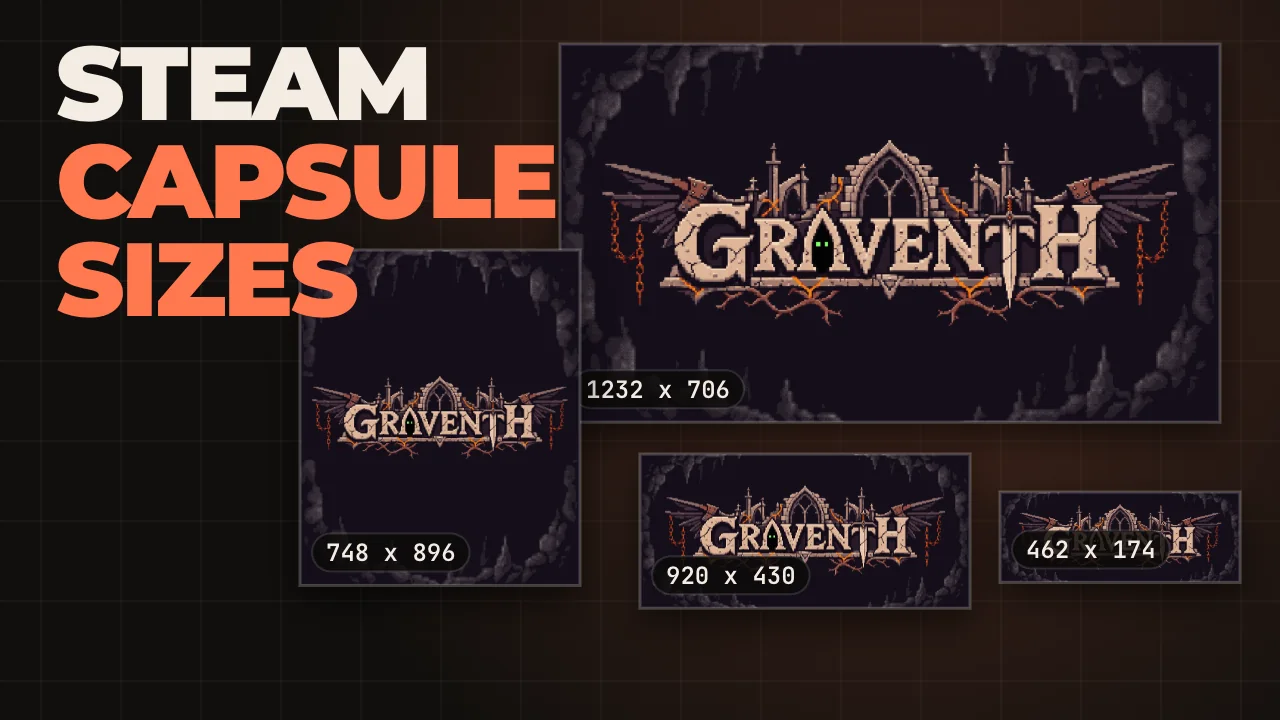
As of November 2026 the four required store capsules are the header at 920 x 430, the small capsule at 462 x 174, the main capsule at 1232 x 706 and the vertical capsule at 748 x 896, all in pixels. Valve started accepting these larger sizes in August 2024 and says the old dimensions are no longer accepted, so older guides with smaller numbers are out of date.
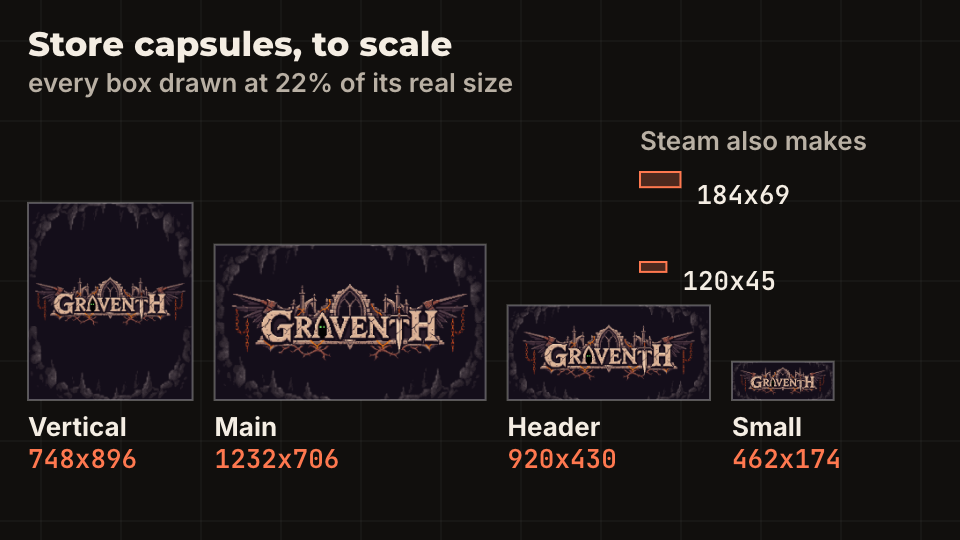
The diagram draws them at 22 percent of their real size so you can see how different the shapes are. The wide ones leave room for art around the logo. The small one is barely a strip, and that is the one most players see first. Steam makes the 184 x 69 and 120 x 45 versions from your small capsule, so you do not upload them.
The capsules in the images are our own, for GRAVENTH, used here as real examples. Check the sizes in Valve's graphical assets overview before you export, because Valve updates the page and its templates.
Where does each capsule appear?
Each size has a job, and that tells you where to spend the effort. Valve describes them like this:
- Header 920 x 430: the top of your store page, Recommended For You, Big Picture browse views and Daily Deals.
- Small 462 x 174: search results, top sellers, new releases and other lists. This is where most people see you.
- Main 1232 x 706: the carousel at the top of the Steam store home page.
- Vertical 748 x 896: the top of the front page during seasonal sales and on new sale pages.
- Page background 1438 x 810, optional: an ambient image behind the page, kept dark and quiet so it does not fight the text.
What can and cannot be on a capsule?
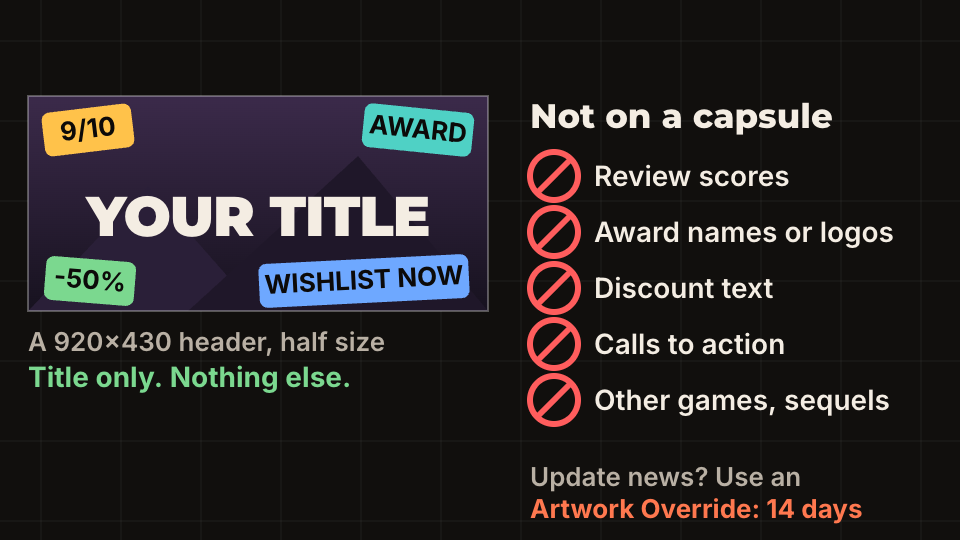
Store capsules may carry game art, the game name and an official subtitle, and nothing else. Valve's rules list what to leave off: review scores from Steam or the press, award names and logos, discount text such as an on-sale message, calls to action such as wishlist or pre-purchase prompts, and text or images that promote other products, including sequels.
The rules apply from 1 September 2022, and the penalty is practical: a game that breaks them can get limited visibility in the store and may not be eligible for official sales and events. Capsules also need a readable title or logo, and the art has to be suitable for a PG-13 audience.
If you want to announce a major update, a season, a battle pass or DLC, use an Artwork Override instead. It expires after a fixed time of up to 14 days, it must be localized for at least the languages your game supports, and it can only describe something that is live now. Wishlist now and a future date are not allowed even there. Do not paint the news into the permanent capsule, because you will have to redo it.
How big should the logo be on a small capsule?
Valve says the logo should nearly fill the small capsule, and that this capsule does not have to match the others. You can use a tighter crop or a simpler background here, and you should.
We measured our own GRAVENTH files by counting the bright logo pixels. The logo spans about 82 percent of the width on the small capsule, 83 on the header, 87 on the main capsule and 91 on the vertical one. That is why the small version still reads.
The animation shrinks the real small capsule to the sizes Steam makes, next to a copy where we drew the same logo at half width. The preview uses a browser's own scaling, not Steam's, so treat it as a close guide. At 184 px the full-width logo still reads and the half-width one is already hard to make out. At 120 px the full-width one is the only one with a chance.
The rule that follows: design the small capsule first, zoom the file out to 120 px wide, and check you can still read the title. Then build the larger capsules from the same logo. The vertical capsule is the exception: our logo sits in a band across the middle of a tall image, which works because the logo is still wide.
What are the library assets?
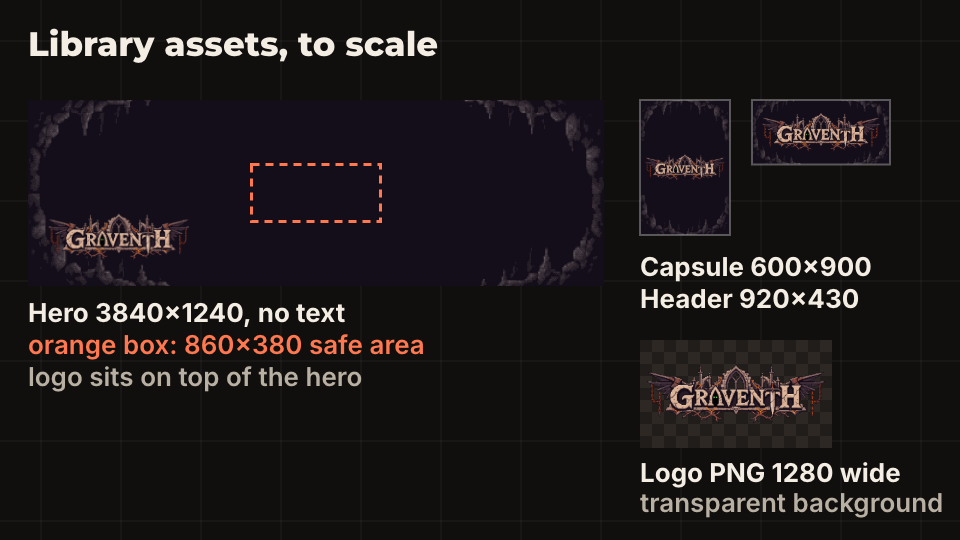
The Steam Library uses four more required images. The library capsule is 600 x 900 and may hold the logo and a subtitle. The library header is 920 x 430 and defaults to your store header if you leave it empty. The library hero is 3840 x 1240 and can have no text at all. The library logo is a PNG on a transparent background, 1280 pixels wide or 720 tall.
The hero and the logo are separate layers that move a little when the player scrolls, so the logo sits on the hero instead of being part of it. After uploading, you pick the logo position: bottom left, top centre, middle centre or bottom centre. Keep anything important inside the 860 x 380 safe area at the middle of the hero, which stays uncropped when the client window is resized. A face at the edge is the one that gets cut.
These images only appear in the Steam client once your store page is published. If you do not upload a hero and logo, Steam shows a screenshot with your game name at the bottom left.
What should you check before uploading?
Do this in order, because the cheapest fixes come first. Valve's review asks for a readable title on every capsule, and each round of review feedback costs days. The wider schedule is in the Steamworks setup checklist.
- Export every capsule at the exact pixel size, not close to it.
- Check the file at 120 px wide: can you read the title?
- Remove everything that is not art, title or subtitle: scores, awards, prices, dates, calls to action.
- Keep the hero free of text and the main subject inside 860 x 380.
- Provide the logo as a PNG with a transparent background.
- Add at least five gameplay screenshots at 1920 x 1080 or larger, and read store page tags and description for the rest of the page.
- Open the page on a phone-sized window and look at the first screen. Capsules are part of how a player decides, and wishlists before launch depend on that first look.
Questions people ask
- Do I need to upload the 184 x 69 and 120 x 45 capsules?
- No. Valve generates both from your 462 x 174 small capsule. Check how your logo looks at those sizes, because that is what players see in many lists.
- Can I put the release date or a discount on a capsule?
- Not on the permanent capsules. Valve's rules ban discount text and calls to action. Time-limited news goes into an Artwork Override, which expires after 14 days at most and must describe something that is live.
- Is the library hero allowed to have the game title?
- No. The hero must have no text. Put the title in the separate library logo, which is a transparent PNG placed on top of the hero.