
Steam guide · · 7 min read
Steamworks setup checklist: from the $100 fee to Release App
Every step from the Steam Direct fee to the Release App button, in order, with the waiting periods and review times Valve lists, checked in November 2026.
How long does it take to go from zero to release on Steam?
Plan on at least four weeks, and more if your tax check is slow. As of November 2026, Valve's onboarding page lists three clocks for your first few titles: a 21-day wait between paying the app fee and releasing, a Coming Soon page that has to be public for at least two weeks, and a tax verification that can take up to 30 days.
They run side by side, so the longest one decides the date. In the example below the fee is paid on day 0, the store page is sent for review on day 3, and both reviews take 7 working days. The Coming Soon page goes public on day 12 and has its two weeks by day 26. If the tax check takes the full 30 days, day 30 is the real earliest date.
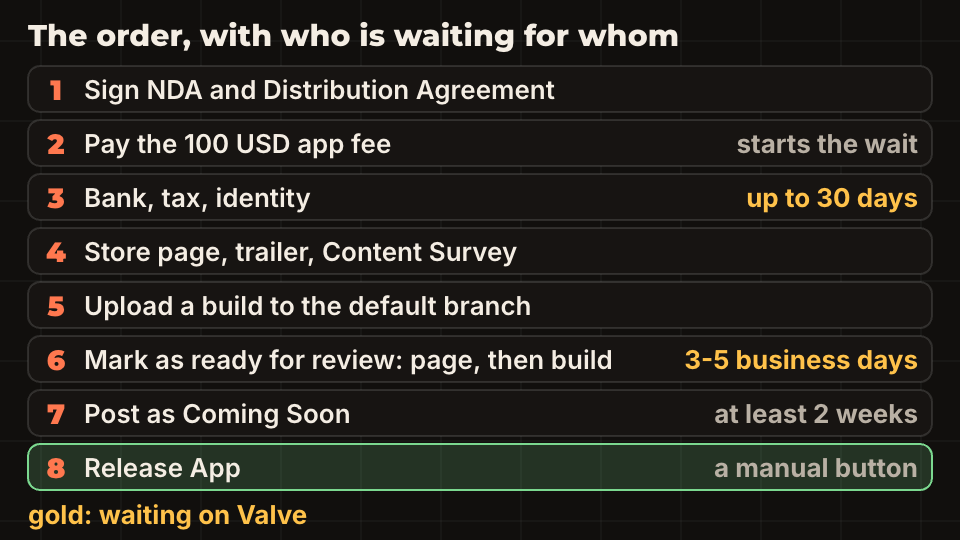
Valve also says you cannot release before valid banking and tax information is in. That is why the paperwork is the first job, not the last. For the shorter overview and our own release notes, read publishing an indie game on Steam. This guide is the order of operations and the clocks.
What does the Steam Direct fee cost, and who should pay it?
The fee is 100 USD, or the local equivalent, for each new app. It is not refundable. Valve returns it as a line in your monthly report once the product has at least 1,000 USD in adjusted gross revenue from the Steam store or in-app purchases.
Only a user with Admin permission in a Steamworks partner account can pay. You can use any payment method Steam supports in your country except Steam wallet funds. The app credit belongs to the account that paid, and only that person can activate it. Tax on the fee is invoiced to that person too, and Valve does not issue duplicate invoices.
So decide who pays before anyone clicks. If a friend pays with their own login to be helpful, the credit sits in their account and the invoice has their name on it. If a company will reimburse the fee, the payer should be the person the company can pay back.
What does the Steamworks paperwork ask for?
You sign two documents, the Non-Disclosure Agreement and the Steam Distribution Agreement, then give bank details, a tax questionnaire and proof of identity. US citizens and companies need the information from a W-9. Citizens and companies in a country with a US tax treaty need the information from a W-8BEN.
The mistake that stalls people is a name that does not match. The company legal name must be the legal entity that owns or has the right to publish the game, and it has to match your bank and your tax documents exactly. Valve's FAQ says to use your full legal name, not a nickname, studio brand or DBA, and to avoid characters that exist only in languages other than English.
You can onboard as an individual. Choose the form Sole Proprietorship, enter your legal first and last name, and make sure the account holder name on your bank account is the same. After you submit, a third-party service verifies the tax information, which Valve says can take up to 30 days, and you cannot edit that information until it finishes. Keep an eye on the email address you used, because requests for extra documents arrive there.
What goes on the Steamworks release checklist, and in what order?
Once you have paid and created the app, the app landing page shows two checklists: Store Presence and Game Build. The store page needs the capsules, screenshots, description and trailer. See Steam capsule art sizes for the images and Steam tags and store page for the text.
You must also finish the Content Survey before you submit anything. It has three parts: general content, mature content, and a part about generative AI in content that ships with the game. Answer it honestly. Valve compares your answers with the build and the page, and some answers cannot be edited after approval without contacting Steam Support. If that part applies to you, read Steam AI disclosure rules.
For the build, upload a mostly final version to the default branch. It must contain every feature your page lists. Uploading with SteamPipe is its own topic: see uploading a build with steamcmd. If you use Godot, GodotSteam setup covers the engine side.
How long does Steam review take, and what do they check?
Valve reviews the store page and the build separately. Both typically take 3 to 5 business days, and Valve asks you to plan for 7. You must submit the store page first. The build can only be submitted after that, using Mark as ready for review on the app landing page.
On the store page they look for content that is not in the game, unfinished features, capsules without a readable title, screenshots that are not gameplay, and descriptions that are thin or contain links to other sites. On the build they check that it starts on every operating system the page lists, that every listed feature is implemented, and that in-game purchases go through Steam Wallet.
Review happens once. After approval you can keep updating the game, but Valve asks you to submit a near-final build. If you plan a feature for later, remove its tick in the Basic Info tab until it ships, or the build review can come back with feedback.
What does Release App need?
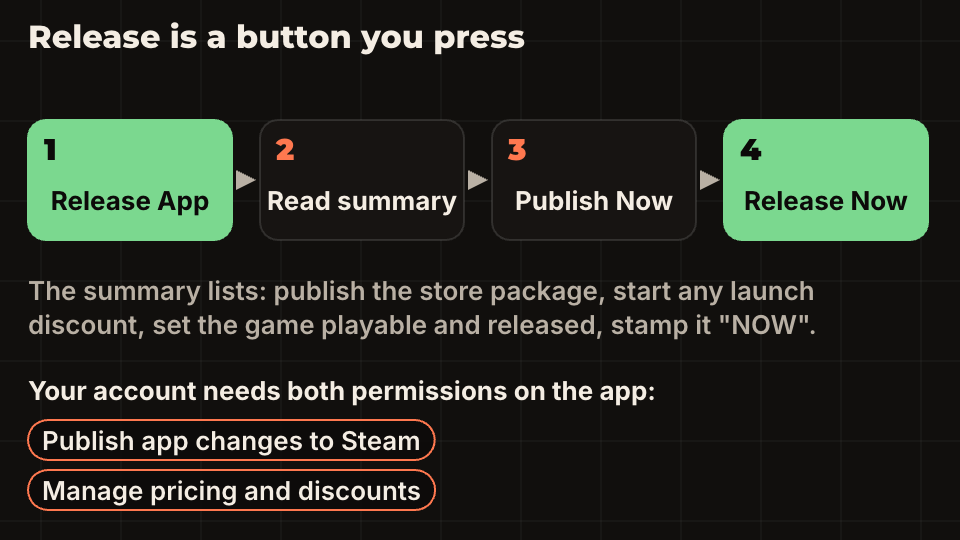
Nothing releases by itself. When the page is approved, the build is approved and the Coming Soon page is two weeks old, a green Release App button appears on the app landing page. Your account needs two permissions on that app: Publish app changes to Steam and Manage pricing and discounts. Without both, you get an error and the release does not start.
The next screen summarises what will happen, then you press Publish Now, confirm, and press Release Now. Valve's date picker hides weekends because the Steam team is not there to help. You can still release on a Saturday if the app is approved, but a problem on a weekend is yours alone.
You can move the release date until two weeks before it. Inside two weeks the game starts to show in upcoming lists, and changes stop. That is also the reason to set a real date early, which the wishlist guide explains.
Which mistakes cost the most time?
Most delays come from the same few things. None of them is hard to avoid, but each one resets a clock.
- Starting the tax questionnaire last. It can take up to 30 days and cannot be changed while it runs.
- A name that is not your legal name, or a bank account in a different name.
- The wrong person paying the fee, so the app credit sits in an account nobody else can use.
- Submitting a page that shows features, screenshots or trailer scenes that are not in the build.
- Leaving the Coming Soon page for the end. Two weeks is the minimum, and it is also when wishlists start.
- Setting a release date on the weekend, or changing it inside the last two weeks.
Questions people ask
- Can I use Steamworks as an individual without a company?
- Yes. Valve says it is fine to onboard as an individual. Choose Sole Proprietorship, enter your legal first and last name, and use a bank account in that same name.
- Is the Steam Direct fee refundable?
- No. It is 100 USD per app and non-refundable, but Valve returns it through your monthly report once the product reaches 1,000 USD in adjusted gross revenue.
- Can I skip the Coming Soon period?
- Not for a new product. Valve's documents require the page to be public for at least two weeks before release, and you cannot release until the store page and build are both approved.