
Google Play guide · · 6 min read
Google Play Data safety form for a game with AdMob ads
Fill the Google Play Data safety form for a game with AdMob: what the SDK collects and shares, how it maps to form answers, plus ads, ad ID and rating checks.
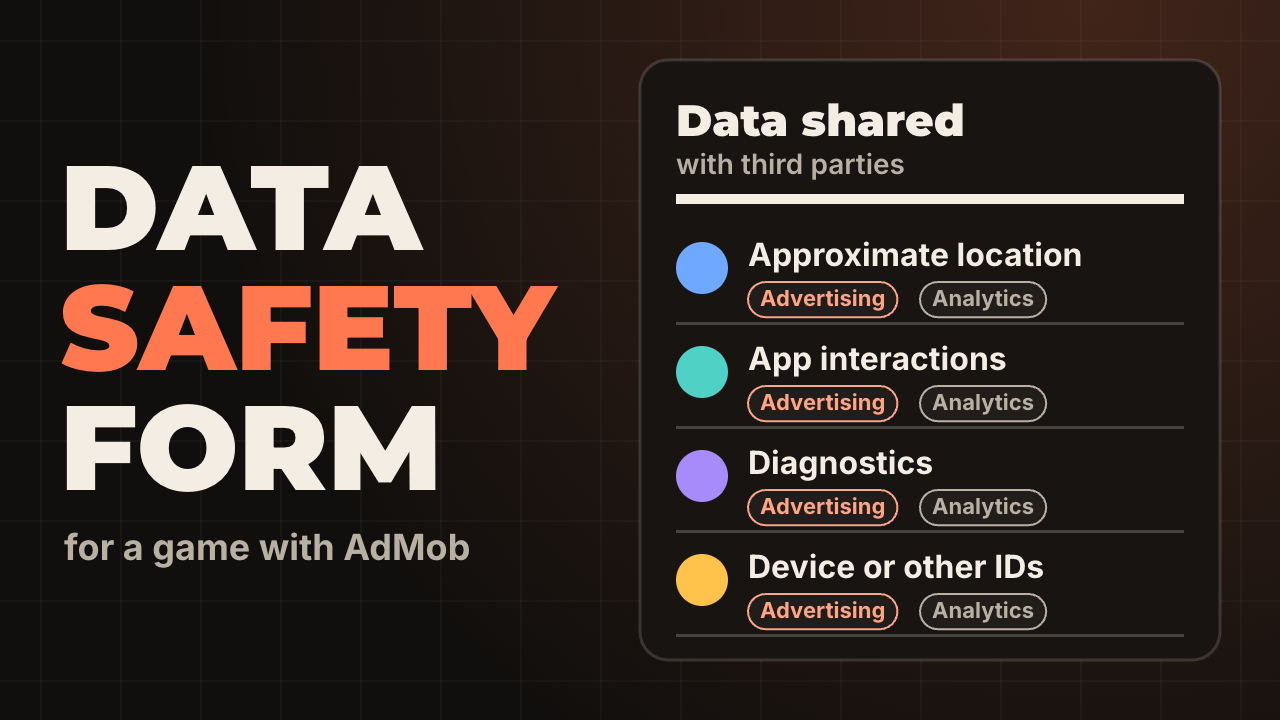
Do you have to complete the Data safety form for a game with AdMob?
Yes, and for a game with ads the honest answer is never no data collected. Google requires the form for every app on a closed, open or production track, even apps that collect nothing. Only apps that exist on internal testing alone are exempt. You also add a privacy policy, which Google says you need to complete the form and to have your data safety information shown.
Google reviews the form during app review but does not check that it is true. You are responsible for it, and Google says apps that misrepresent their data practices can have updates blocked or be removed. Update the form every time your data practices change, for example when you add an SDK.
In Google's terms, collecting means data leaves the device, including data sent by libraries and SDKs. That is the part people miss with ads: you wrote no code that sends an IP address, but the ad SDK in your game does. The animation shows the line. A save file that never leaves the phone is not declared. What the ad SDK transmits is.
What does AdMob collect and share, and what do you answer?
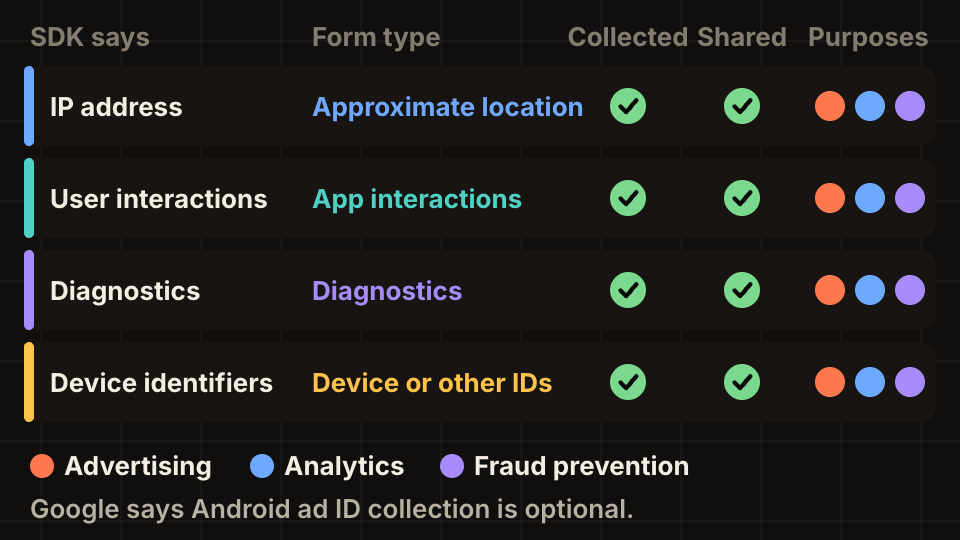
Google's page on the Google Mobile Ads SDK, last updated November 5, 2026, says it collects and shares four things by default, for advertising, analytics and fraud prevention: IP address, user product interactions such as app launch, taps and video views, diagnostic information such as launch time, hang rate and energy use, and device and account identifiers, which include the Android advertising ID and app set ID.
The page does not name the Play form's data types, so use Android's guide to data types. It lists deriving location from an IP address under Location, which makes the first row Approximate location. Interactions go under App activity as App interactions. Diagnostics go under App info and performance as Diagnostics. Identifiers go under Device or other IDs, a category the guide says includes the advertising identifier. For each of the four, answer collected and shared, with the purposes advertising, analytics and fraud prevention.
Two cautions. Google calls Android ad ID collection optional and says you can prevent it through the manifest. Google also says features such as Limited Ads may disable sending the ad ID and other data, but does not say the other three go away, so keep declaring them. And the page you read depends on the SDK: the one above is for the Legacy SDK, version 25.5.0, which carries a notice that it is in maintenance mode. The GMA Next-Gen SDK page lists the same four types. Check which one your Godot AdMob plugin bundles.
How do you decide between collected and shared?
Sharing means transferring the collected data to a third party, including through an SDK. Google lists exemptions from declaring data: it stays on the device, it is processed only in memory and discarded, it goes to a service provider acting only on your behalf, it is required by law, it is a user-initiated transfer or one covered by a prominent in-app disclosure and consent, or it is anonymized.
None of those rescues ad data. Google says data used for advertising or user profiles cannot be treated as ephemeral, and that the service provider exemption does not cover building advertising profiles across customers. The decision path below ends where the AdMob row does: collected and shared.
What else goes into the form for a game?
AdMob is one SDK. The form covers everything in your build:
- Every other SDK. You answer for third-party code, so read each provider's own disclosure. The Google Play SDK Index can help you find it.
- Analytics and crash reporting. Crash logs and diagnostics are data types of their own.
- Accounts, player IDs and cloud saves, if you have them. A player ID tied to a person is a User ID.
- Purchases through Google Play Billing. Google says financial data collected directly by a payment provider like Play billing need not be declared if your app never accesses it.
- Encryption in transit and data deletion. Google says deletion can be met by automatic deletion or anonymization within 90 days of collection.
Which other declarations does an ad-supported game need?
Play Console's App content page asks for more than the data form. For a game with AdMob, expect these:
- Ads declaration: answer Yes if the game has banner, interstitial or native ads from an ad SDK, or house ads for your own apps. Your listing then shows a Contains ads label. Answering No is for a simple More Apps section in the menu. Misrepresenting ads can lead to suspension.
- Advertising ID: apps that target Android 13 (API 33) or higher need the com.google.android.gms.permission.AD_ID permission in the manifest. The Google Mobile Ads library may already add it through manifest merging. If a user deletes their ad ID, your app gets zeros.
- Content rating: complete the questionnaire for each new app, and again when a change affects your answers. Google states that apps without a rating are removed from the store.
- Target audience: you declare the age groups, and that choice decides which policies apply.
What changes if children might play your game?
If children are in your target audience, the Families policy applies, and it is stricter than the rest of this guide. For children and users of unknown age you may only use Google Play Families Self-Certified Ads SDKs, with no interest-based ads or remarketing and no personalized ads. Apps for both children and older users need an age screen such as a neutral age screen. Apps for children alone must not transmit the advertising ID at all, and mixed audience apps must not transmit it from children or users of unknown age.
Read the policy before you pick age groups in Play Console, and again before you pick ad settings in AdMob. We use AdMob rewarded and interstitial ads in our iPhone games and wrote up how that went through review in our ITMS-91064 article. The Android forms are different, but the lesson is the same: the declaration has to match what the build really does.
The forms are only one of several gates. A new personal account also needs the closed test, and the bundle needs the right target API and 16 KB support. For the Apple side, see the App Store Connect submission checklist.
Questions people ask
- Do you need the Data safety form if your game only shows AdMob ads?
- Yes. Every app on a closed, open or production track must complete it, and an ad SDK collects and shares data such as IP address and device identifiers.
- What data does the Google Mobile Ads SDK collect?
- By default, according to Google: IP address, user product interactions, diagnostic information, and device and account identifiers such as the Android advertising ID. Google says the data is encrypted in transit with TLS.
- Can you answer that your game collects no data when you use AdMob?
- Not honestly. Google says you must reflect data collected or shared by third-party code in your app, and its own SDK page lists what AdMob collects and shares.
Sources and further reading
- Play Console Help: Provide information for Google Play's Data safety section
- Google for Developers: Google Play data disclosure (Google Mobile Ads SDK)
- Android Developers: Declare data use for the Data safety form
- Play Console Help: Provide information for Google Play's review (App content)
- Play Console Help: Content ratings for apps and games
- Play Console Help: Advertising ID
- Play Console Help: Families policy requirements