App Store guide · · 6 min read
Submit a game to the App Store: first submission checklist
Every step from the $99 developer account to Add for Review, in order, with the fields that block a first game submission and what App Review checks.
What do you need before you can submit a game?
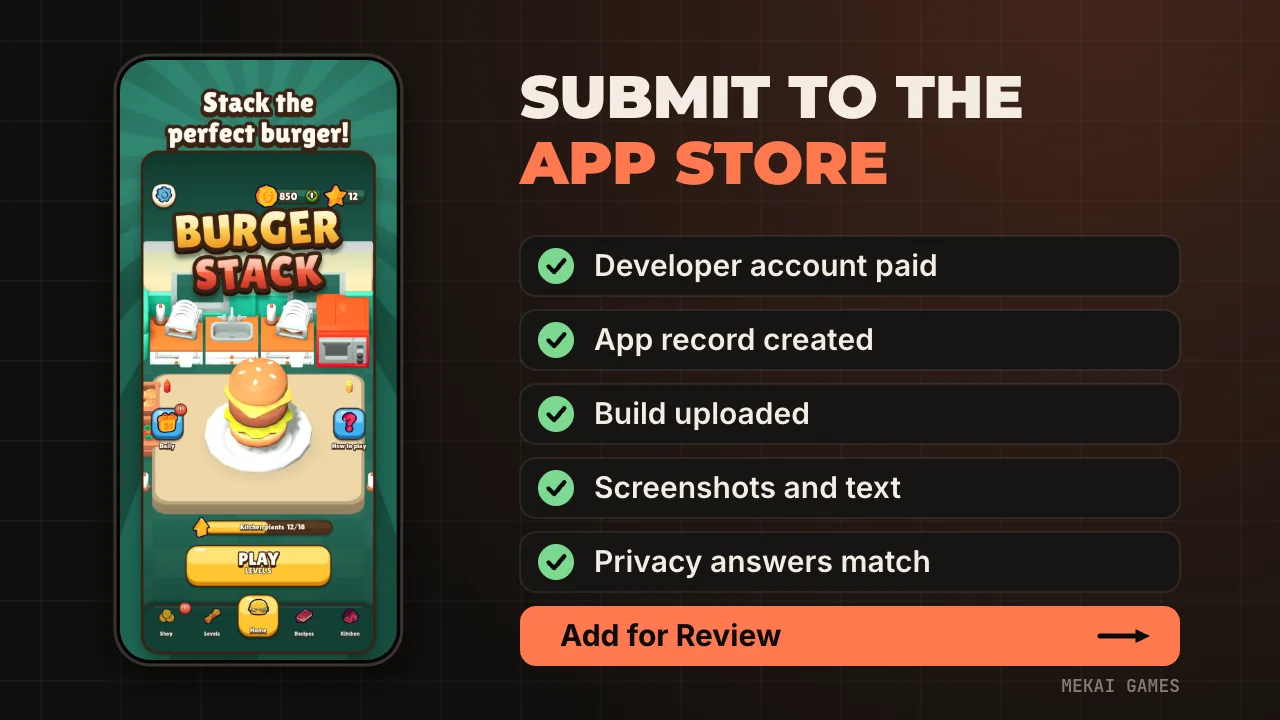
An Apple Developer Program membership, which costs 99 USD per year as of November 2026 (local currency where available), a Mac with Xcode, and a build made with Xcode 26 or later. Apple has required the iOS 26 SDK for uploads since 28 April 2026, so an older Xcode is a dead end.
Enrolling as an individual shows your legal name as the seller on the App Store. Enrolling as an organization shows the organization's legal name, and Apple asks for a D-U-N-S number, a work email on the organization's domain and a working public website. Social media pages and registrar placeholder pages are not accepted. Use your legal name in the form: aliases and company names in the name fields slow approval down.
Fee waivers exist, but only for nonprofits, accredited schools and government entities that do not sell digital goods. A game studio will not qualify.
How do you get a Godot build into App Store Connect?
Export an Xcode project from Godot, archive it in Xcode and upload the archive. In the Godot iOS preset, App Store Team ID and Identifier under Application are required and the export fails with an error if either is empty. The Team ID is the 10 character code on your developer account, not your name. Keep spaces out of the file name, because Godot's docs warn they can corrupt the Xcode project.
The Identifier you type here is the bundle ID, and it has to match the one on the app record you create next. Settle it before you create anything in App Store Connect.
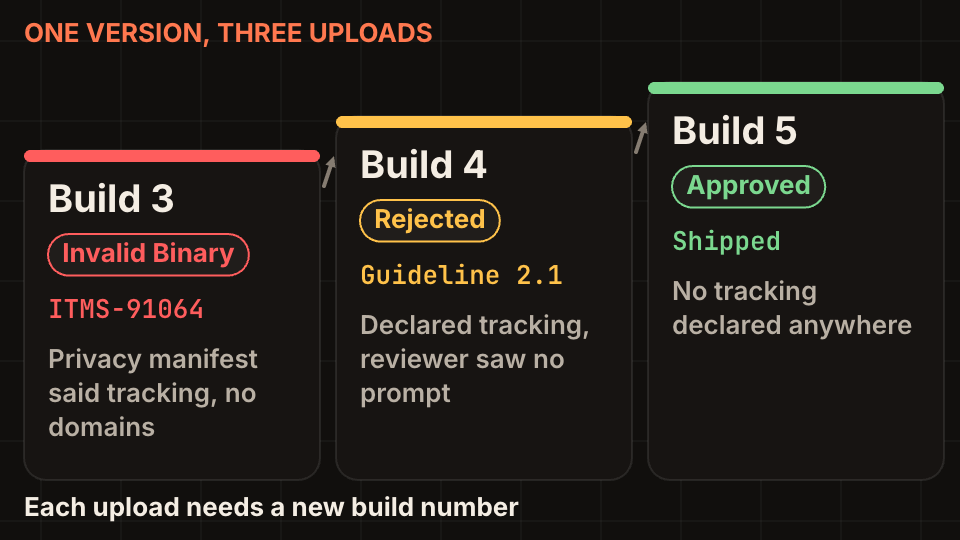
Every upload needs a build number that has not been used before for that version. We needed three uploads to ship Burger Stack 1.2.0, so we bump application/version before every export. Before archiving, read the privacy settings in the exported project: the ITMS-91064 article covers the one that turned our build 3 into an Invalid Binary.
How do you create the app record and fill the store page?
In App Store Connect, choose Apps, then the plus button, then New App. It asks for the platform, the name, the primary language, the bundle ID, a SKU and the user access. Only the Account Holder, an Admin or an App Manager can create it, and the Account Holder must have signed the latest agreements first. An app name is unique per localization: if another developer holds yours and you own the trademark, Apple has a claim form.
Then the store page itself. These are the limits that surprise people, as of November 2026:
- Name: 2 to 30 characters. Subtitle: up to 30.
- Promotional text: 170 characters, and you can change it without a new build.
- Description: 4,000 characters, plain text only.
- Keywords: 100 bytes in total, each keyword longer than two characters. Do not repeat your app name or the company name, and do not use other apps' names.
- Notes for the reviewer: up to 4,000 bytes. A demo account, if you have sign-in, must not expire.
- A support URL with real contact information, a copyright line, and a privacy policy URL.
Which answers get first submissions rejected?
The ones that do not match the build. Apple's own list of common rejections starts with crashes and bugs, broken links and placeholder content, all under guideline 2.1, which asks for a final, working version with complete metadata. Test on a real device, with a fresh install, before you upload.
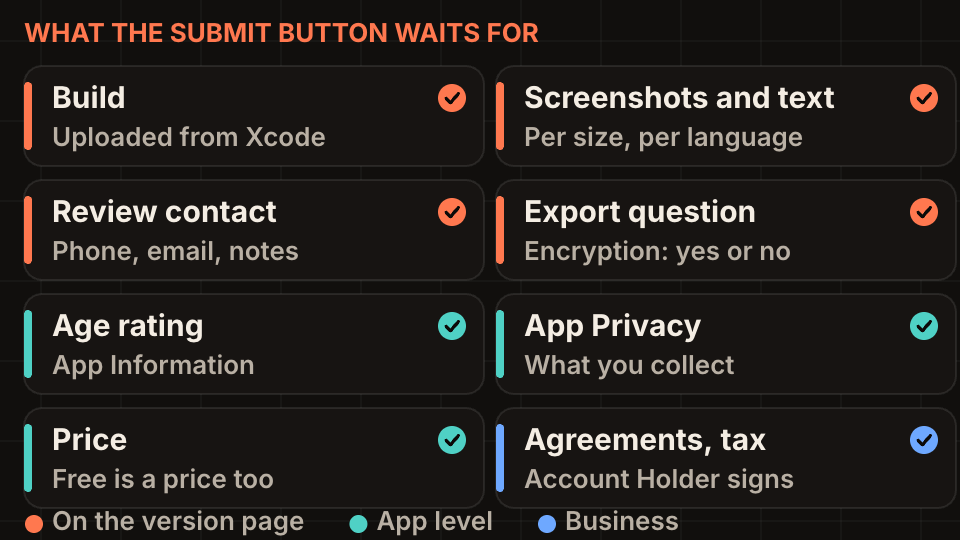
Three answers need to agree with each other: the App Privacy section, your privacy policy and what the binary does. Guideline 5.1.1 requires the policy to be linked in App Store Connect and inside the app. For a game with ads, decide first whether you track, then answer everything from that decision. Our ads setup is in the ITMS-91064 article, and the other frequent rejections are in App Store rejection reasons for games.
Age rating changed in 2026. Apple moved all apps to a new rating system with 13+, 16+ and 18+ tiers, and asked developers to answer the updated questions by 31 January 2026. Loot boxes now count as 9+ content. Answer honestly: guideline 2.3.6 says a wrong rating can cause trouble for you, not only for players.
If the game sells anything, read the in-app purchase guide first. Your first in-app purchase has to be submitted together with a new app version, and the reviewer must be able to find it.
How do you submit, and what happens next?
Open the version in the sidebar, check the build, then click Add for Review in the top right and choose a draft submission. The status becomes Ready for Review, but nothing has been sent. Open the draft under App Review in the sidebar and click Submit for Review. Only the Account Holder, an Admin or an App Manager can do this.
Each platform can have one app version in review at a time. Statuses you will see: Prepare for Submission, Waiting for Review, In Review, then Pending Developer Release or Ready for Distribution. Rejected, Metadata Rejected and Invalid Binary mean you have something to fix. Invalid Binary comes with an email to the account holder that carries the real error code, so look for it.
Choose how the version is released before you submit: manually, automatically after approval, or on a scheduled date. An approved app can take up to 24 hours to appear in every storefront.
What did our first submissions look like?
Burger Stack is a Godot 4.5 puzzle game, and version 1.2.0 went through three builds: an Invalid Binary, a 2.1 rejection and then the build that shipped. All three problems came from one wrong choice, declaring tracking. None of them was a missing field.
Plan for one failed round. Upload early in the week, keep the review notes short and specific, and answer a rejection in App Store Connect with what you changed. The next article, TestFlight beta testing, shows how to catch most of these problems on your own device and a few testers' phones first.
Checklist before you press Add for Review
Run through this on the day you submit.
- Membership active and agreements signed by the Account Holder.
- Archived with Xcode 26 or later, and the build number is new.
- Bundle ID in Godot equals the one on the app record.
- Screenshots for the required sizes, showing the game in use (see screenshot sizes and keywords).
- Description, keywords, support URL and privacy policy URL filled, no placeholder text.
- Age rating answered, App Privacy matches the privacy policy and the binary.
- Reviewer contact filled, notes written, demo account that does not expire if the game has sign-in.
- Install the exact build from TestFlight on a clean device and play the first five minutes.
Questions people ask
- How much does it cost to put a game on the App Store?
- The Apple Developer Program costs 99 USD per year as of November 2026. Fee waivers are limited to nonprofits, schools and government entities.
- How long does App Review take for a new game?
- Apple states that at least 50% of submissions are reviewed in under 24 hours and at least 90% in under 48 hours. Incomplete submissions and repeated rejections for the same issue can take longer.
- Can I submit a Godot game from Windows or Linux?
- You can export from any desktop, but the iOS project has to be built, archived and uploaded with Xcode, which only runs on a Mac.
Sources and further reading
- Apple: Join the Apple Developer Program
- Apple: Fee waivers
- Apple: Upcoming requirements
- App Store Connect Help: Add a new app
- App Store Connect Help: Platform version information
- App Store Connect Help: Submit an app
- App Store Connect Help: App and submission statuses
- Apple: App Review
- App Review Guidelines
- Godot docs: Exporting for iOS