Godot guide · · 5 min read
Godot 2D particles: explosion, dust, sparks and trail
Four Godot 4.5 GPUParticles2D effects with the exact settings: explosion, dust, sparks and trail, captured in the engine, plus GPU against CPU particles.
How do you make an explosion with GPUParticles2D?
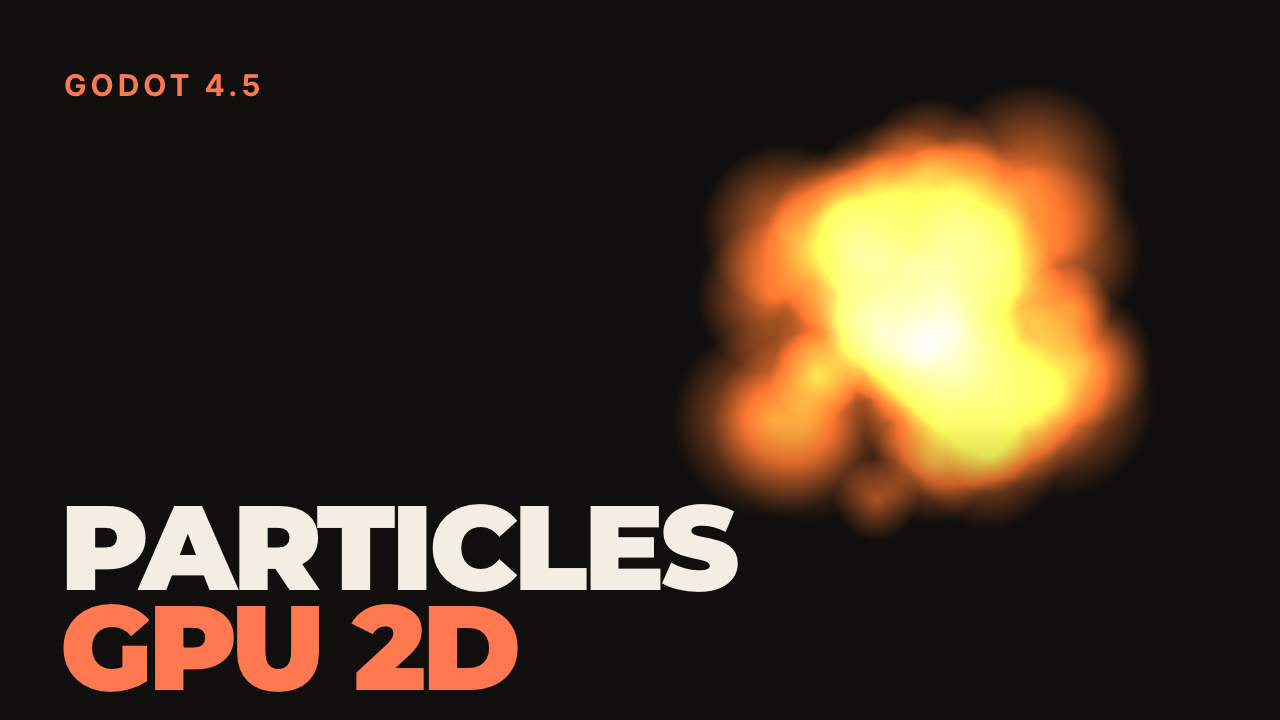
Make one burst of soft dots: one_shot on, explosiveness 1.0, a wide spread, a high start speed that damping brings to a stop, a shrinking scale_curve and a color ramp from yellow to red to transparent. The settings below made the explosion in the animation, in Godot 4.5.1.
Every picture in this guide is a real capture from one run of one Godot project (Forward+ renderer on an Apple M2 Pro). The effects are built in code, so the same functions are in the article. The settings that matter most are the two the animation hides: the particle texture, a radial gradient made with GradientTexture2D, and the blend mode, set to Add with a CanvasItemMaterial. Add makes overlapping particles brighter, which is what fire does.
# effects.gd: every effect of the article as a plain function. Godot 4.5.
class_name Effects
extends RefCounted


static func soft_dot(size := 64) -> GradientTexture2D:
	var gradient := Gradient.new()
	gradient.set_color(0, Color(1, 1, 1, 1))
	gradient.set_color(1, Color(1, 1, 1, 0))
	var tex := GradientTexture2D.new()
	tex.gradient = gradient
	tex.fill = GradientTexture2D.FILL_RADIAL
	tex.fill_from = Vector2(0.5, 0.5)
	tex.fill_to = Vector2(1.0, 0.5)
	tex.width = size
	tex.height = size
	return tex


static func streak() -> ImageTexture:
	# 6 x 28 px, bright at the head and fading to nothing, for sparks.
	var img := Image.create(6, 28, false, Image.FORMAT_RGBA8)
	for y in 28:
		var a := pow(float(y) / 27.0, 1.5)
		for x in 6:
			var edge := 1.0 - absf(x - 2.5) / 3.0
			img.set_pixel(x, y, Color(1, 1, 1, a * clampf(edge * 1.4, 0.0, 1.0)))
	return ImageTexture.create_from_image(img)


static func ramp(colors: Array, offsets: Array) -> GradientTexture1D:
	var gradient := Gradient.new()
	gradient.offsets = PackedFloat32Array(offsets)
	gradient.colors = PackedColorArray(colors)
	var tex := GradientTexture1D.new()
	tex.gradient = gradient
	return tex


static func curve(points: Array) -> CurveTexture:
	var c := Curve.new()
	for p in points:
		c.add_point(p)
	var tex := CurveTexture.new()
	tex.curve = c
	return tex


static func additive() -> CanvasItemMaterial:
	var m := CanvasItemMaterial.new()
	m.blend_mode = CanvasItemMaterial.BLEND_MODE_ADD
	return m


static func _base(texture: Texture2D, amount: int, lifetime: float, one_shot: bool) -> GPUParticles2D:
	var p := GPUParticles2D.new()
	p.texture = texture
	p.amount = amount
	p.lifetime = lifetime
	p.one_shot = one_shot
	p.emitting = false
	return p


# Layer 1: a single big, very short flash. It sells the hit more than anything else.
static func flash() -> GPUParticles2D:
	var p := _base(soft_dot(128), 1, 0.18, true)
	p.explosiveness = 1.0
	p.material = additive()
	var m := ParticleProcessMaterial.new()
	m.scale_min = 4.0
	m.scale_max = 4.0
	m.scale_curve = curve([Vector2(0, 0.4), Vector2(0.3, 1.0), Vector2(1, 0.7)])
	m.color_ramp = ramp([Color(1, 0.95, 0.8, 1), Color(1, 0.55, 0.2, 0)], [0.0, 1.0])
	p.process_material = m
	return p


# Layer 2: fire. Many soft dots flying out, slowing down, shrinking, fading from yellow to red.
static func fire(explosiveness := 1.0) -> GPUParticles2D:
	var p := _base(soft_dot(), 48, 0.8, true)
	p.explosiveness = explosiveness
	p.randomness = 0.4
	p.material = additive()
	var m := ParticleProcessMaterial.new()
	m.direction = Vector3(0, -1, 0)
	m.spread = 180.0
	m.initial_velocity_min = 180.0
	m.initial_velocity_max = 520.0
	m.damping_min = 180.0
	m.damping_max = 300.0
	m.gravity = Vector3(0, -60, 0)
	m.scale_min = 1.0
	m.scale_max = 2.4
	m.scale_curve = curve([Vector2(0, 0.5), Vector2(0.2, 1.0), Vector2(1, 0.0)])
	m.color_ramp = ramp([Color(1, 0.95, 0.6, 1), Color(1, 0.45, 0.15, 0.9), Color(0.5, 0.1, 0.05, 0)], [0.0, 0.35, 1.0])
	p.process_material = m
	return p


# Fire it:
func explode(at: Vector2) -> void:
	var fx := Effects.fire()
	fx.position = at
	add_child(fx)
	fx.restart()
	fx.emitting = true
fx.finished.connect(fx.queue_free)amount48,lifetime0.8 s,one_shottrue,explosiveness1.0,randomness0.4.initial_velocity180 to 520,damping180 to 300,spread180.scale1.0 to 2.4 with a curve that grows to 1.0 then falls to 0.- Color ramp: pale yellow, orange at 0.35, dark red at 0 alpha.
Why is an explosion three or four emitters, not one?
Because each part wants different settings. The flash is one particle that lives 0.18 s and is big. The fire is many small additive dots. The smoke uses normal blending, so it darkens what is behind it, and it lives 1.4 s so it outlasts the fire. One emitter cannot be additive and normal at the same time, and cannot be short and long at the same time.
The animation shows each layer alone, then all three. The fire alone looks like confetti. The flash alone is a blink. Together they read as a hit. This is the cheapest improvement in most particle effects: split by blend mode and lifetime. The game feel checklist says what else belongs on a hit, such as shake and a pause.
# effects.gd: every effect of the article as a plain function. Godot 4.5.
class_name Effects
extends RefCounted


static func soft_dot(size := 64) -> GradientTexture2D:
	var gradient := Gradient.new()
	gradient.set_color(0, Color(1, 1, 1, 1))
	gradient.set_color(1, Color(1, 1, 1, 0))
	var tex := GradientTexture2D.new()
	tex.gradient = gradient
	tex.fill = GradientTexture2D.FILL_RADIAL
	tex.fill_from = Vector2(0.5, 0.5)
	tex.fill_to = Vector2(1.0, 0.5)
	tex.width = size
	tex.height = size
	return tex


static func streak() -> ImageTexture:
	# 6 x 28 px, bright at the head and fading to nothing, for sparks.
	var img := Image.create(6, 28, false, Image.FORMAT_RGBA8)
	for y in 28:
		var a := pow(float(y) / 27.0, 1.5)
		for x in 6:
			var edge := 1.0 - absf(x - 2.5) / 3.0
			img.set_pixel(x, y, Color(1, 1, 1, a * clampf(edge * 1.4, 0.0, 1.0)))
	return ImageTexture.create_from_image(img)


static func ramp(colors: Array, offsets: Array) -> GradientTexture1D:
	var gradient := Gradient.new()
	gradient.offsets = PackedFloat32Array(offsets)
	gradient.colors = PackedColorArray(colors)
	var tex := GradientTexture1D.new()
	tex.gradient = gradient
	return tex


static func curve(points: Array) -> CurveTexture:
	var c := Curve.new()
	for p in points:
		c.add_point(p)
	var tex := CurveTexture.new()
	tex.curve = c
	return tex


static func additive() -> CanvasItemMaterial:
	var m := CanvasItemMaterial.new()
	m.blend_mode = CanvasItemMaterial.BLEND_MODE_ADD
	return m


static func _base(texture: Texture2D, amount: int, lifetime: float, one_shot: bool) -> GPUParticles2D:
	var p := GPUParticles2D.new()
	p.texture = texture
	p.amount = amount
	p.lifetime = lifetime
	p.one_shot = one_shot
	p.emitting = false
	return p


# Layer 1: a single big, very short flash. It sells the hit more than anything else.
static func flash() -> GPUParticles2D:
	var p := _base(soft_dot(128), 1, 0.18, true)
	p.explosiveness = 1.0
	p.material = additive()
	var m := ParticleProcessMaterial.new()
	m.scale_min = 4.0
	m.scale_max = 4.0
	m.scale_curve = curve([Vector2(0, 0.4), Vector2(0.3, 1.0), Vector2(1, 0.7)])
	m.color_ramp = ramp([Color(1, 0.95, 0.8, 1), Color(1, 0.55, 0.2, 0)], [0.0, 1.0])
	p.process_material = m
	return p


# Layer 2: fire. Many soft dots flying out, slowing down, shrinking, fading from yellow to red.
static func fire(explosiveness := 1.0) -> GPUParticles2D:
	var p := _base(soft_dot(), 48, 0.8, true)
	p.explosiveness = explosiveness
	p.randomness = 0.4
	p.material = additive()
	var m := ParticleProcessMaterial.new()
	m.direction = Vector3(0, -1, 0)
	m.spread = 180.0
	m.initial_velocity_min = 180.0
	m.initial_velocity_max = 520.0
	m.damping_min = 180.0
	m.damping_max = 300.0
	m.gravity = Vector3(0, -60, 0)
	m.scale_min = 1.0
	m.scale_max = 2.4
	m.scale_curve = curve([Vector2(0, 0.5), Vector2(0.2, 1.0), Vector2(1, 0.0)])
	m.color_ramp = ramp([Color(1, 0.95, 0.6, 1), Color(1, 0.45, 0.15, 0.9), Color(0.5, 0.1, 0.05, 0)], [0.0, 0.35, 1.0])
	p.process_material = m
	return p


# Layer 3: smoke. Normal blending, so it darkens what is behind it. Slow, long, rising.
static func smoke() -> GPUParticles2D:
	var p := _base(soft_dot(), 18, 1.4, true)
	p.explosiveness = 0.9
	p.randomness = 0.5
	var m := ParticleProcessMaterial.new()
	m.direction = Vector3(0, -1, 0)
	m.spread = 70.0
	m.initial_velocity_min = 40.0
	m.initial_velocity_max = 160.0
	m.damping_min = 60.0
	m.damping_max = 120.0
	m.gravity = Vector3(0, -90, 0)
	m.scale_min = 2.0
	m.scale_max = 3.4
	m.scale_curve = curve([Vector2(0, 0.4), Vector2(1, 1.0)])
	m.color_ramp = ramp([Color(0.32, 0.28, 0.26, 0.0), Color(0.3, 0.26, 0.24, 0.75), Color(0.2, 0.18, 0.17, 0)], [0.0, 0.2, 1.0])
	p.process_material = m
	return p
How do you make dust behind a running character?
Emit puffs at the feet while the character runs, with local_coords off. With it on (the default), every puff moves with the emitter and the dust sticks to the player's boots. With it off, each puff stays where it was born and the character leaves it behind. Start them slow (30 to 90 px/s), let them grow with a scale_curve that ends at 1.8, and fade a soft tan to transparent.
The runner is the Pilot from Pinglets, our desktop pet, in a side view platformer scene. Dust is emitted only while the character is on screen, and stops at the edge.
# effects.gd: every effect of the article as a plain function. Godot 4.5.
class_name Effects
extends RefCounted


static func soft_dot(size := 64) -> GradientTexture2D:
	var gradient := Gradient.new()
	gradient.set_color(0, Color(1, 1, 1, 1))
	gradient.set_color(1, Color(1, 1, 1, 0))
	var tex := GradientTexture2D.new()
	tex.gradient = gradient
	tex.fill = GradientTexture2D.FILL_RADIAL
	tex.fill_from = Vector2(0.5, 0.5)
	tex.fill_to = Vector2(1.0, 0.5)
	tex.width = size
	tex.height = size
	return tex


static func streak() -> ImageTexture:
	# 6 x 28 px, bright at the head and fading to nothing, for sparks.
	var img := Image.create(6, 28, false, Image.FORMAT_RGBA8)
	for y in 28:
		var a := pow(float(y) / 27.0, 1.5)
		for x in 6:
			var edge := 1.0 - absf(x - 2.5) / 3.0
			img.set_pixel(x, y, Color(1, 1, 1, a * clampf(edge * 1.4, 0.0, 1.0)))
	return ImageTexture.create_from_image(img)


static func ramp(colors: Array, offsets: Array) -> GradientTexture1D:
	var gradient := Gradient.new()
	gradient.offsets = PackedFloat32Array(offsets)
	gradient.colors = PackedColorArray(colors)
	var tex := GradientTexture1D.new()
	tex.gradient = gradient
	return tex


static func curve(points: Array) -> CurveTexture:
	var c := Curve.new()
	for p in points:
		c.add_point(p)
	var tex := CurveTexture.new()
	tex.curve = c
	return tex


static func additive() -> CanvasItemMaterial:
	var m := CanvasItemMaterial.new()
	m.blend_mode = CanvasItemMaterial.BLEND_MODE_ADD
	return m


static func _base(texture: Texture2D, amount: int, lifetime: float, one_shot: bool) -> GPUParticles2D:
	var p := GPUParticles2D.new()
	p.texture = texture
	p.amount = amount
	p.lifetime = lifetime
	p.one_shot = one_shot
	p.emitting = false
	return p


# Layer 1: a single big, very short flash. It sells the hit more than anything else.
static func flash() -> GPUParticles2D:
	var p := _base(soft_dot(128), 1, 0.18, true)
	p.explosiveness = 1.0
	p.material = additive()
	var m := ParticleProcessMaterial.new()
	m.scale_min = 4.0
	m.scale_max = 4.0
	m.scale_curve = curve([Vector2(0, 0.4), Vector2(0.3, 1.0), Vector2(1, 0.7)])
	m.color_ramp = ramp([Color(1, 0.95, 0.8, 1), Color(1, 0.55, 0.2, 0)], [0.0, 1.0])
	p.process_material = m
	return p


# Layer 2: fire. Many soft dots flying out, slowing down, shrinking, fading from yellow to red.
static func fire(explosiveness := 1.0) -> GPUParticles2D:
	var p := _base(soft_dot(), 48, 0.8, true)
	p.explosiveness = explosiveness
	p.randomness = 0.4
	p.material = additive()
	var m := ParticleProcessMaterial.new()
	m.direction = Vector3(0, -1, 0)
	m.spread = 180.0
	m.initial_velocity_min = 180.0
	m.initial_velocity_max = 520.0
	m.damping_min = 180.0
	m.damping_max = 300.0
	m.gravity = Vector3(0, -60, 0)
	m.scale_min = 1.0
	m.scale_max = 2.4
	m.scale_curve = curve([Vector2(0, 0.5), Vector2(0.2, 1.0), Vector2(1, 0.0)])
	m.color_ramp = ramp([Color(1, 0.95, 0.6, 1), Color(1, 0.45, 0.15, 0.9), Color(0.5, 0.1, 0.05, 0)], [0.0, 0.35, 1.0])
	p.process_material = m
	return p


# Layer 3: smoke. Normal blending, so it darkens what is behind it. Slow, long, rising.
static func smoke() -> GPUParticles2D:
	var p := _base(soft_dot(), 18, 1.4, true)
	p.explosiveness = 0.9
	p.randomness = 0.5
	var m := ParticleProcessMaterial.new()
	m.direction = Vector3(0, -1, 0)
	m.spread = 70.0
	m.initial_velocity_min = 40.0
	m.initial_velocity_max = 160.0
	m.damping_min = 60.0
	m.damping_max = 120.0
	m.gravity = Vector3(0, -90, 0)
	m.scale_min = 2.0
	m.scale_max = 3.4
	m.scale_curve = curve([Vector2(0, 0.4), Vector2(1, 1.0)])
	m.color_ramp = ramp([Color(0.32, 0.28, 0.26, 0.0), Color(0.3, 0.26, 0.24, 0.75), Color(0.2, 0.18, 0.17, 0)], [0.0, 0.2, 1.0])
	p.process_material = m
	return p


# Layer 4: sparks. Streaks that turn to face where they are going and fall with gravity.
static func sparks(spread := 180.0, direction := Vector3(0, -1, 0), gravity := 1500.0) -> GPUParticles2D:
	var p := _base(streak(), 28, 0.7, true)
	p.explosiveness = 1.0
	p.randomness = 0.3
	p.material = additive()
	var m := ParticleProcessMaterial.new()
	m.direction = direction
	m.spread = spread
	m.initial_velocity_min = 350.0
	m.initial_velocity_max = 900.0
	m.gravity = Vector3(0, gravity, 0)
	m.particle_flag_align_y = true
	m.scale_min = 0.8
	m.scale_max = 1.6
	m.color_ramp = ramp([Color(1, 0.95, 0.7, 1), Color(1, 0.6, 0.2, 1), Color(1, 0.3, 0.1, 0)], [0.0, 0.5, 1.0])
	p.process_material = m
	return p


# Dust puffs behind a runner. local_coords is off, so each puff stays where it was born.
static func dust() -> GPUParticles2D:
	var p := _base(soft_dot(), 14, 0.55, false)
	p.local_coords = false
	p.emitting = false
	var m := ParticleProcessMaterial.new()
	m.emission_shape = ParticleProcessMaterial.EMISSION_SHAPE_BOX
	m.emission_box_extents = Vector3(8, 2, 1)
	m.direction = Vector3(-1, -0.6, 0)
	m.spread = 25.0
	m.initial_velocity_min = 30.0
	m.initial_velocity_max = 90.0
	m.gravity = Vector3(0, -40, 0)
	m.scale_min = 0.5
	m.scale_max = 0.9
	m.scale_curve = curve([Vector2(0, 0.5), Vector2(1, 1.8)])
	m.color_ramp = ramp([Color(0.78, 0.7, 0.6, 0.55), Color(0.7, 0.62, 0.52, 0.35), Color(0.6, 0.55, 0.5, 0)], [0.0, 0.4, 1.0])
	p.process_material = m
	return p
How do you make sparks that fall?
Use a thin streak texture, turn on particle_flag_align_y so each spark points where it is travelling, and give it real gravity. Here gravity is 1500 px/s², with a start speed of 350 to 900 and a spread of 75 degrees tilted to the right. Without align_y the streaks just rotate in place and look like glitter.
The streak is a 6 by 28 image built in code. It is bright at one end and fades to nothing at the other, so the fading end trails behind the spark.
# effects.gd: every effect of the article as a plain function. Godot 4.5.
class_name Effects
extends RefCounted


static func soft_dot(size := 64) -> GradientTexture2D:
	var gradient := Gradient.new()
	gradient.set_color(0, Color(1, 1, 1, 1))
	gradient.set_color(1, Color(1, 1, 1, 0))
	var tex := GradientTexture2D.new()
	tex.gradient = gradient
	tex.fill = GradientTexture2D.FILL_RADIAL
	tex.fill_from = Vector2(0.5, 0.5)
	tex.fill_to = Vector2(1.0, 0.5)
	tex.width = size
	tex.height = size
	return tex


static func streak() -> ImageTexture:
	# 6 x 28 px, bright at the head and fading to nothing, for sparks.
	var img := Image.create(6, 28, false, Image.FORMAT_RGBA8)
	for y in 28:
		var a := pow(float(y) / 27.0, 1.5)
		for x in 6:
			var edge := 1.0 - absf(x - 2.5) / 3.0
			img.set_pixel(x, y, Color(1, 1, 1, a * clampf(edge * 1.4, 0.0, 1.0)))
	return ImageTexture.create_from_image(img)


static func ramp(colors: Array, offsets: Array) -> GradientTexture1D:
	var gradient := Gradient.new()
	gradient.offsets = PackedFloat32Array(offsets)
	gradient.colors = PackedColorArray(colors)
	var tex := GradientTexture1D.new()
	tex.gradient = gradient
	return tex


static func curve(points: Array) -> CurveTexture:
	var c := Curve.new()
	for p in points:
		c.add_point(p)
	var tex := CurveTexture.new()
	tex.curve = c
	return tex


static func additive() -> CanvasItemMaterial:
	var m := CanvasItemMaterial.new()
	m.blend_mode = CanvasItemMaterial.BLEND_MODE_ADD
	return m


static func _base(texture: Texture2D, amount: int, lifetime: float, one_shot: bool) -> GPUParticles2D:
	var p := GPUParticles2D.new()
	p.texture = texture
	p.amount = amount
	p.lifetime = lifetime
	p.one_shot = one_shot
	p.emitting = false
	return p


# Layer 1: a single big, very short flash. It sells the hit more than anything else.
static func flash() -> GPUParticles2D:
	var p := _base(soft_dot(128), 1, 0.18, true)
	p.explosiveness = 1.0
	p.material = additive()
	var m := ParticleProcessMaterial.new()
	m.scale_min = 4.0
	m.scale_max = 4.0
	m.scale_curve = curve([Vector2(0, 0.4), Vector2(0.3, 1.0), Vector2(1, 0.7)])
	m.color_ramp = ramp([Color(1, 0.95, 0.8, 1), Color(1, 0.55, 0.2, 0)], [0.0, 1.0])
	p.process_material = m
	return p


# Layer 2: fire. Many soft dots flying out, slowing down, shrinking, fading from yellow to red.
static func fire(explosiveness := 1.0) -> GPUParticles2D:
	var p := _base(soft_dot(), 48, 0.8, true)
	p.explosiveness = explosiveness
	p.randomness = 0.4
	p.material = additive()
	var m := ParticleProcessMaterial.new()
	m.direction = Vector3(0, -1, 0)
	m.spread = 180.0
	m.initial_velocity_min = 180.0
	m.initial_velocity_max = 520.0
	m.damping_min = 180.0
	m.damping_max = 300.0
	m.gravity = Vector3(0, -60, 0)
	m.scale_min = 1.0
	m.scale_max = 2.4
	m.scale_curve = curve([Vector2(0, 0.5), Vector2(0.2, 1.0), Vector2(1, 0.0)])
	m.color_ramp = ramp([Color(1, 0.95, 0.6, 1), Color(1, 0.45, 0.15, 0.9), Color(0.5, 0.1, 0.05, 0)], [0.0, 0.35, 1.0])
	p.process_material = m
	return p


# Layer 3: smoke. Normal blending, so it darkens what is behind it. Slow, long, rising.
static func smoke() -> GPUParticles2D:
	var p := _base(soft_dot(), 18, 1.4, true)
	p.explosiveness = 0.9
	p.randomness = 0.5
	var m := ParticleProcessMaterial.new()
	m.direction = Vector3(0, -1, 0)
	m.spread = 70.0
	m.initial_velocity_min = 40.0
	m.initial_velocity_max = 160.0
	m.damping_min = 60.0
	m.damping_max = 120.0
	m.gravity = Vector3(0, -90, 0)
	m.scale_min = 2.0
	m.scale_max = 3.4
	m.scale_curve = curve([Vector2(0, 0.4), Vector2(1, 1.0)])
	m.color_ramp = ramp([Color(0.32, 0.28, 0.26, 0.0), Color(0.3, 0.26, 0.24, 0.75), Color(0.2, 0.18, 0.17, 0)], [0.0, 0.2, 1.0])
	p.process_material = m
	return p


# Layer 4: sparks. Streaks that turn to face where they are going and fall with gravity.
static func sparks(spread := 180.0, direction := Vector3(0, -1, 0), gravity := 1500.0) -> GPUParticles2D:
	var p := _base(streak(), 28, 0.7, true)
	p.explosiveness = 1.0
	p.randomness = 0.3
	p.material = additive()
	var m := ParticleProcessMaterial.new()
	m.direction = direction
	m.spread = spread
	m.initial_velocity_min = 350.0
	m.initial_velocity_max = 900.0
	m.gravity = Vector3(0, gravity, 0)
	m.particle_flag_align_y = true
	m.scale_min = 0.8
	m.scale_max = 1.6
	m.color_ramp = ramp([Color(1, 0.95, 0.7, 1), Color(1, 0.6, 0.2, 1), Color(1, 0.3, 0.1, 0)], [0.0, 0.5, 1.0])
	p.process_material = m
	return p
What is the difference between a trail and a blob?
One property: local_coords. The animation has two orbs moving on the same path with the same emitter. In the top lane local_coords is true, so the particles ride along and the orb looks like it has a small halo. In the bottom lane it is false, so each particle is left where it spawned and the orb draws a tail that fades over 0.8 s.
Godot also has a ribbon style trail setting on GPUParticles2D, which this guide did not test. The local_coords method works on any particle node and is enough for most glow trails.
# effects.gd: every effect of the article as a plain function. Godot 4.5.
class_name Effects
extends RefCounted


static func soft_dot(size := 64) -> GradientTexture2D:
	var gradient := Gradient.new()
	gradient.set_color(0, Color(1, 1, 1, 1))
	gradient.set_color(1, Color(1, 1, 1, 0))
	var tex := GradientTexture2D.new()
	tex.gradient = gradient
	tex.fill = GradientTexture2D.FILL_RADIAL
	tex.fill_from = Vector2(0.5, 0.5)
	tex.fill_to = Vector2(1.0, 0.5)
	tex.width = size
	tex.height = size
	return tex


static func streak() -> ImageTexture:
	# 6 x 28 px, bright at the head and fading to nothing, for sparks.
	var img := Image.create(6, 28, false, Image.FORMAT_RGBA8)
	for y in 28:
		var a := pow(float(y) / 27.0, 1.5)
		for x in 6:
			var edge := 1.0 - absf(x - 2.5) / 3.0
			img.set_pixel(x, y, Color(1, 1, 1, a * clampf(edge * 1.4, 0.0, 1.0)))
	return ImageTexture.create_from_image(img)


static func ramp(colors: Array, offsets: Array) -> GradientTexture1D:
	var gradient := Gradient.new()
	gradient.offsets = PackedFloat32Array(offsets)
	gradient.colors = PackedColorArray(colors)
	var tex := GradientTexture1D.new()
	tex.gradient = gradient
	return tex


static func curve(points: Array) -> CurveTexture:
	var c := Curve.new()
	for p in points:
		c.add_point(p)
	var tex := CurveTexture.new()
	tex.curve = c
	return tex


static func additive() -> CanvasItemMaterial:
	var m := CanvasItemMaterial.new()
	m.blend_mode = CanvasItemMaterial.BLEND_MODE_ADD
	return m


static func _base(texture: Texture2D, amount: int, lifetime: float, one_shot: bool) -> GPUParticles2D:
	var p := GPUParticles2D.new()
	p.texture = texture
	p.amount = amount
	p.lifetime = lifetime
	p.one_shot = one_shot
	p.emitting = false
	return p


# Layer 1: a single big, very short flash. It sells the hit more than anything else.
static func flash() -> GPUParticles2D:
	var p := _base(soft_dot(128), 1, 0.18, true)
	p.explosiveness = 1.0
	p.material = additive()
	var m := ParticleProcessMaterial.new()
	m.scale_min = 4.0
	m.scale_max = 4.0
	m.scale_curve = curve([Vector2(0, 0.4), Vector2(0.3, 1.0), Vector2(1, 0.7)])
	m.color_ramp = ramp([Color(1, 0.95, 0.8, 1), Color(1, 0.55, 0.2, 0)], [0.0, 1.0])
	p.process_material = m
	return p


# Layer 2: fire. Many soft dots flying out, slowing down, shrinking, fading from yellow to red.
static func fire(explosiveness := 1.0) -> GPUParticles2D:
	var p := _base(soft_dot(), 48, 0.8, true)
	p.explosiveness = explosiveness
	p.randomness = 0.4
	p.material = additive()
	var m := ParticleProcessMaterial.new()
	m.direction = Vector3(0, -1, 0)
	m.spread = 180.0
	m.initial_velocity_min = 180.0
	m.initial_velocity_max = 520.0
	m.damping_min = 180.0
	m.damping_max = 300.0
	m.gravity = Vector3(0, -60, 0)
	m.scale_min = 1.0
	m.scale_max = 2.4
	m.scale_curve = curve([Vector2(0, 0.5), Vector2(0.2, 1.0), Vector2(1, 0.0)])
	m.color_ramp = ramp([Color(1, 0.95, 0.6, 1), Color(1, 0.45, 0.15, 0.9), Color(0.5, 0.1, 0.05, 0)], [0.0, 0.35, 1.0])
	p.process_material = m
	return p


# Layer 3: smoke. Normal blending, so it darkens what is behind it. Slow, long, rising.
static func smoke() -> GPUParticles2D:
	var p := _base(soft_dot(), 18, 1.4, true)
	p.explosiveness = 0.9
	p.randomness = 0.5
	var m := ParticleProcessMaterial.new()
	m.direction = Vector3(0, -1, 0)
	m.spread = 70.0
	m.initial_velocity_min = 40.0
	m.initial_velocity_max = 160.0
	m.damping_min = 60.0
	m.damping_max = 120.0
	m.gravity = Vector3(0, -90, 0)
	m.scale_min = 2.0
	m.scale_max = 3.4
	m.scale_curve = curve([Vector2(0, 0.4), Vector2(1, 1.0)])
	m.color_ramp = ramp([Color(0.32, 0.28, 0.26, 0.0), Color(0.3, 0.26, 0.24, 0.75), Color(0.2, 0.18, 0.17, 0)], [0.0, 0.2, 1.0])
	p.process_material = m
	return p


# Layer 4: sparks. Streaks that turn to face where they are going and fall with gravity.
static func sparks(spread := 180.0, direction := Vector3(0, -1, 0), gravity := 1500.0) -> GPUParticles2D:
	var p := _base(streak(), 28, 0.7, true)
	p.explosiveness = 1.0
	p.randomness = 0.3
	p.material = additive()
	var m := ParticleProcessMaterial.new()
	m.direction = direction
	m.spread = spread
	m.initial_velocity_min = 350.0
	m.initial_velocity_max = 900.0
	m.gravity = Vector3(0, gravity, 0)
	m.particle_flag_align_y = true
	m.scale_min = 0.8
	m.scale_max = 1.6
	m.color_ramp = ramp([Color(1, 0.95, 0.7, 1), Color(1, 0.6, 0.2, 1), Color(1, 0.3, 0.1, 0)], [0.0, 0.5, 1.0])
	p.process_material = m
	return p


# Dust puffs behind a runner. local_coords is off, so each puff stays where it was born.
static func dust() -> GPUParticles2D:
	var p := _base(soft_dot(), 14, 0.55, false)
	p.local_coords = false
	p.emitting = false
	var m := ParticleProcessMaterial.new()
	m.emission_shape = ParticleProcessMaterial.EMISSION_SHAPE_BOX
	m.emission_box_extents = Vector3(8, 2, 1)
	m.direction = Vector3(-1, -0.6, 0)
	m.spread = 25.0
	m.initial_velocity_min = 30.0
	m.initial_velocity_max = 90.0
	m.gravity = Vector3(0, -40, 0)
	m.scale_min = 0.5
	m.scale_max = 0.9
	m.scale_curve = curve([Vector2(0, 0.5), Vector2(1, 1.8)])
	m.color_ramp = ramp([Color(0.78, 0.7, 0.6, 0.55), Color(0.7, 0.62, 0.52, 0.35), Color(0.6, 0.55, 0.5, 0)], [0.0, 0.4, 1.0])
	p.process_material = m
	return p


# A glowing orb's emitter for the trail demo. local_coords decides whether it leaves a trail.
static func trail(local: bool) -> GPUParticles2D:
	var p := _base(soft_dot(), 40, 0.8, false)
	p.local_coords = local
	p.emitting = false
	p.material = additive()
	var m := ParticleProcessMaterial.new()
	m.initial_velocity_min = 0.0
	m.initial_velocity_max = 10.0
	m.direction = Vector3(0, -1, 0)
	m.spread = 180.0
	m.scale_min = 0.6
	m.scale_max = 0.6
	m.scale_curve = curve([Vector2(0, 1.0), Vector2(1, 0.0)])
	m.color_ramp = ramp([Color(0.5, 0.95, 0.9, 0.9), Color(0.3, 0.6, 1.0, 0.4), Color(0.4, 0.3, 1.0, 0)], [0.0, 0.5, 1.0])
	p.process_material = m
	return p
What does explosiveness change?
It decides how the amount is spread over the lifetime. At 0.0 the particles are emitted evenly across the whole lifetime, so you get a stream. At 1.0 all of them are emitted at the same instant. At 0.5 you get a burst that keeps feeding for a while. The three cells use the same 48 fire particles; only this one number differs.
For a hit or a pickup you almost always want 1.0. Use 0.0 for fire, rain and engine exhaust, and set preprocess so the effect is already running when the scene loads. If particles pop out of view when you move the camera, check the Visibility Rect: Godot hides the node when that rectangle is off screen, and you can generate a good one from Particles > Generate Visibility Rect.
Should you use GPUParticles2D or CPUParticles2D?
Use GPUParticles2D by default, which is what the Godot docs recommend. CPUParticles2D has nearly the same features, can do better on low end hardware or when the GPU is the bottleneck, and gets no new features. Its settings are plain node properties instead of a ParticleProcessMaterial, and it has no trail settings.
You can convert in the editor, in the 2D toolbar with CPUParticles2D > Convert to GPUParticles2D, or in code with convert_from_particles, as in the last animation. In my test the CPU copy looked close but not identical; I copied the material across by hand so the additive blend stayed. I did not measure speed. Test on the weakest phone you support before you decide, and count your particles: ten explosions of 48 is nothing, but a screen of 2000 is not.
For feedback on the screen that is not a particle, such as a flash on the sprite, a hit flash shader is cheaper, and a Tween covers UI popups.
# Same effect on the CPU: convert a GPUParticles2D you already set up.
var cpu := CPUParticles2D.new()
cpu.convert_from_particles(gpu_node)
cpu.position = gpu_node.position
cpu.material = gpu_node.material   # keeps the additive blend
add_child(cpu)
gpu_node.queue_free()
Questions people ask
- Why do my GPUParticles2D not show?
- A new node shows a warning until you add a ParticleProcessMaterial. Also check that emitting is on, that one_shot effects were restarted, and that the Visibility Rect is not off screen.
- How do I play a one shot particle effect again?
- Call restart() on the node, and set emitting to true. Connect to its finished signal to free it if you made it at run time.
- Do GPUParticles2D work in the web export?
- I did not test it. Check the Godot docs for your renderer and test the export before you rely on it, and keep a CPUParticles2D version ready for browsers and older devices.