Godot guide · · 6 min read
Godot 4 state machine for a player: enum or nodes, with code
A Godot 4.5 player state machine written twice, as an enum and as nodes, with working GDScript, a transition table and a 359 tick trace that matches.
What is a state machine, and when does a player need one?
A state machine is a variable that says what the character is doing right now, plus one place that decides when that changes. Use one when a player has three or more modes that react differently to the same input: running, jumping, falling, getting hit. With only idle and run, two booleans are fine.
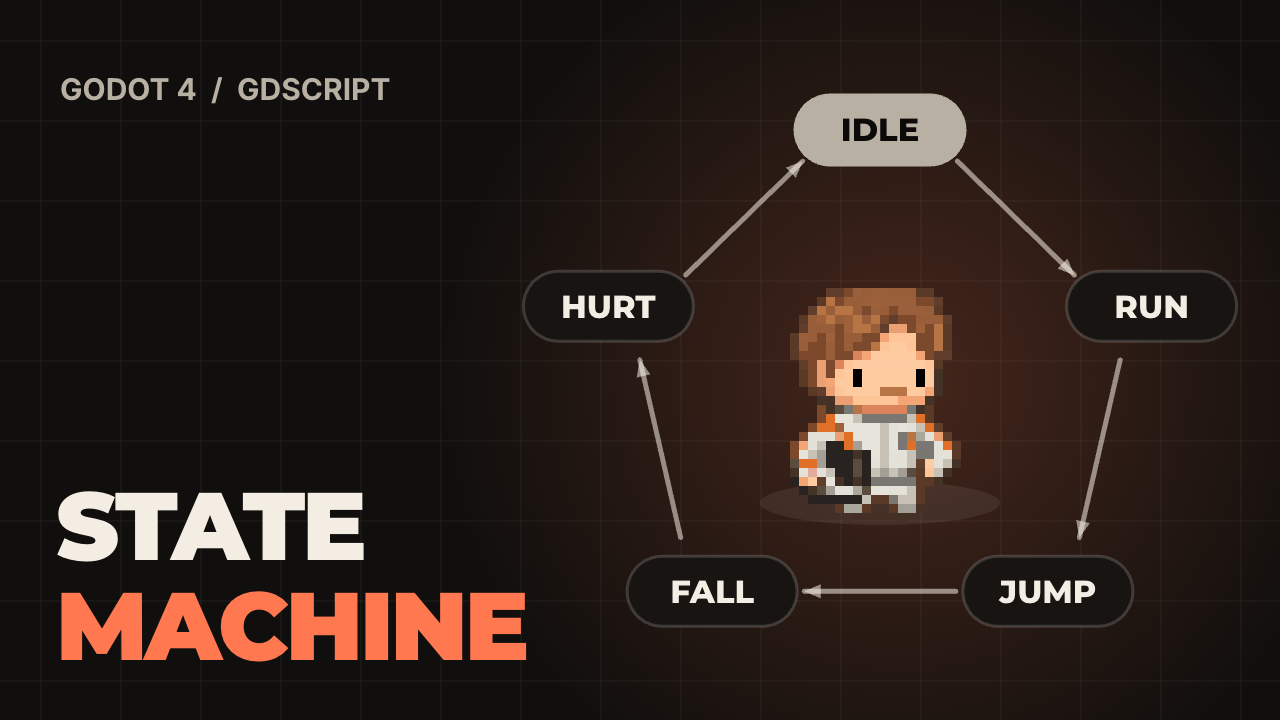
This guide writes the same player twice in GDScript for Godot 4.5.1, once as an enum with a match and once as a node per state. Both run the same scripted session of 359 physics ticks, about 6 seconds, with a run, two jumps, a hit and a drop off a ledge. They end up in the same state with the same position on every tick. The picture plays that session. The character is the Pilot from Pinglets, our desktop pet.
Booleans like is_jumping, is_hurt and is_running can be true at the same time, and every new feature adds a check to each of them. A state machine rules that out: the character is in exactly one state, so it cannot be hurt and jumping.

How do you write an enum state machine in GDScript?
Declare the states in an enum, keep the current one in a variable, and match on it in _physics_process. Each branch reads input and calls _enter when something changes. _enter is the one place where a transition does work: it sets the jump velocity or starts the hurt timer.
Read the direction once, before the match, so every state sees the same value. The state logic runs first and move_and_slide() last, because is_on_floor() describes the previous move. Needs the input actions move_left, move_right and jump.
There is no animation code here. To add it, play the clip inside _enter. The animation then always matches the state, because nothing else picks it.
# player_enum.gd: the enum version. One script, one match. Godot 4.5.
# Needs input actions move_left, move_right and jump.
extends CharacterBody2D

enum State { IDLE, RUN, JUMP, FALL, HURT }

const SPEED := 240.0
const JUMP_SPEED := 560.0
const GRAVITY := 1800.0
const HURT_TIME := 0.3

var state := State.IDLE
var _hurt_left := 0.0


func _physics_process(delta: float) -> void:
	var dir := Input.get_axis("move_left", "move_right")

	match state:
		State.IDLE:
			if not is_on_floor():
				_enter(State.FALL)
			elif Input.is_action_just_pressed("jump"):
				_enter(State.JUMP)
			elif dir != 0.0:
				_enter(State.RUN)
		State.RUN:
			velocity.x = dir * SPEED
			if not is_on_floor():
				_enter(State.FALL)
			elif Input.is_action_just_pressed("jump"):
				_enter(State.JUMP)
			elif dir == 0.0:
				_enter(State.IDLE)
		State.JUMP, State.FALL:
			velocity.x = dir * SPEED
			if state == State.JUMP and velocity.y >= 0.0:
				_enter(State.FALL)
			elif state == State.FALL and is_on_floor():
				_enter(State.IDLE if dir == 0.0 else State.RUN)
		State.HURT:
			_hurt_left -= delta
			if _hurt_left <= 0.0 and is_on_floor():
				_enter(State.IDLE)

	if not is_on_floor():
		velocity.y += GRAVITY * delta
	move_and_slide()


func hurt(knockback: Vector2) -> void:
	velocity = knockback
	_enter(State.HURT)


func _enter(next: State) -> void:
	state = next
	match next:
		State.IDLE:
			velocity.x = 0.0
		State.JUMP:
			velocity.y = -JUMP_SPEED
		State.HURT:
			_hurt_left = HURT_TIME
How do you build a node-based state machine?
Make one node per state and put them under a StateMachine node that is a child of the player. The machine holds the current state, calls its physics_update every tick, and switches when the state returns the name of another state. Returning &"" means stay.
Order matters. A parent runs its _physics_process before its children, so by default the player would move first and the state would set velocity for the next tick, one tick late. Setting process_physics_priority = -1 on the machine makes it run first. With that line the node version matches the enum version on all 359 ticks. Without it, the positions differed on 282 of 359 ticks, starting at tick 11.
# state_machine.gd
class_name StateMachine
extends Node

@export var initial: PlayerState

var current: PlayerState


func _ready() -> void:
	# Run before the player moves, so a state's velocity is used on the same tick.
	process_physics_priority = -1


func _physics_process(delta: float) -> void:
	if current == null:
		return
	var next := current.physics_update(delta)
	if next != &"":
		change_to(next)


func change_to(state_name: StringName) -> void:
	var previous := current.name if current else &""
	if current:
		current.exit()
	current = get_node(String(state_name))
	current.enter(previous)


# player_state.gd
class_name PlayerState
extends Node

var player: Player


func enter(_previous: StringName) -> void:
	pass


func exit() -> void:
	pass


# Return the name of the next state, or &"" to stay.
func physics_update(_delta: float) -> StringName:
	return &""
What does one state look like as a node?
A state is a small script that extends the base class. Run reads the direction, sets the horizontal speed and returns the name of the next state when something changes. It never switches itself, so every transition in the project is a return line you can search for.
Jump sets velocity.y in enter, which runs once. Hurt starts a 0.3 second timer and never reads input, so the jump pressed on tick 212 of the session did nothing: the character stayed in Hurt for 22 ticks, from tick 205, because it also waits to touch the floor.
The player script gives each state its reference in _ready, then starts the machine. Children run _ready before their parent, which is why the player does it and not the machine. In the scene tree the states are plain Node children, so adding a state means adding a node and a script, and initial is set in the Inspector.
# player.gd
class_name Player
extends CharacterBody2D

const SPEED := 240.0
const JUMP_SPEED := 560.0
const GRAVITY := 1800.0

@onready var machine: StateMachine = $StateMachine


func _ready() -> void:
	for state: PlayerState in machine.get_children():
		state.player = self
	machine.change_to(machine.initial.name)


func _physics_process(delta: float) -> void:
	if not is_on_floor():
		velocity.y += GRAVITY * delta
	move_and_slide()


func hurt(knockback: Vector2) -> void:
	velocity = knockback
	machine.change_to(&"Hurt")


# run.gd
extends PlayerState


func physics_update(_delta: float) -> StringName:
	var dir := Input.get_axis("move_left", "move_right")
	player.velocity.x = dir * Player.SPEED
	if not player.is_on_floor():
		return &"Fall"
	if Input.is_action_just_pressed("jump"):
		return &"Jump"
	if dir == 0.0:
		return &"Idle"
	return &""
Enum or nodes: which one should you pick?
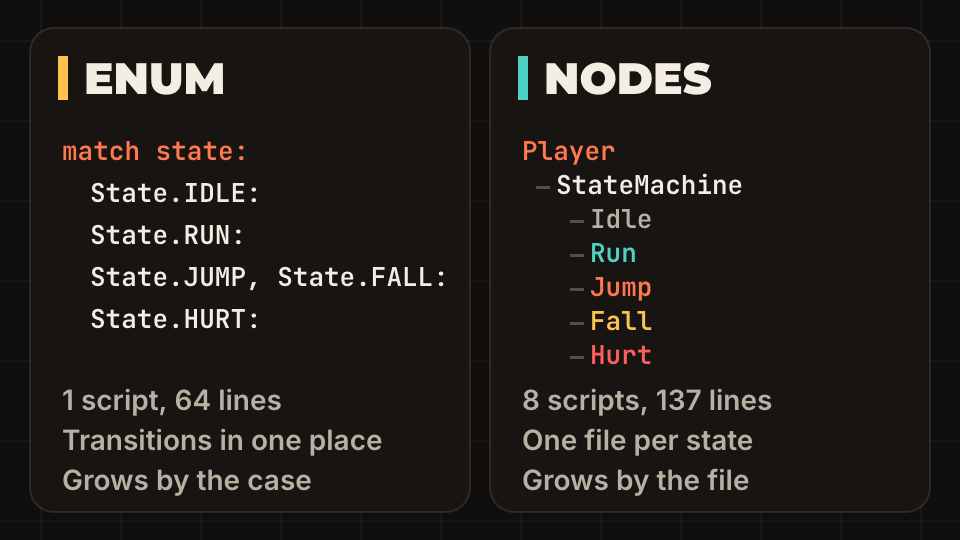
Start with the enum. Switch to nodes when a single state needs its own variables, timers or child nodes, such as a dash with a cooldown or an attack with a hitbox, or when two people edit different states.
The cost is files. The same behavior took 64 lines in one file as an enum and 137 lines in 8 files as nodes, counting blanks and comments. In return each node state can be tested alone, and the same machine and base class work for an enemy. For a three state enemy, nodes are too much.
Godot also has a state machine inside AnimationTree. That one picks animations. It does not replace the gameplay state; the gameplay state tells it which animation to play.
What should each state ignore?
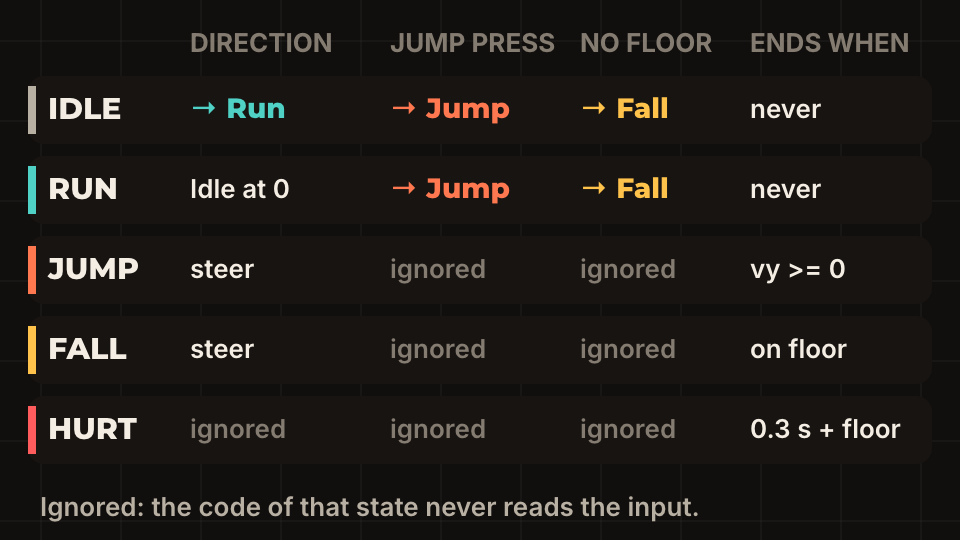
Write the table before the code: for every state, which events matter and where they lead. A cell that says ignored means the state never reads that input.
Two rows carry most of the value. Hurt ignores everything, which is what makes a hit feel like a hit; the rest of that feeling is in the game feel checklist. Jump and Fall ignore the jump press, which is why there is no double jump until you add one on purpose. Coyote time is a rule about Fall: allow a jump for a few frames. Add it there and nowhere else, as described in coyote time and jump buffering.
Every grounded state needs the exit to Fall when the floor disappears. Skip it and a character on a moving platform keeps the idle animation in the air.
How do you test a state machine without opening the game?
Write the input as a script and record the state on every tick. record.gd extends SceneTree, builds both players in code, presses move_right and jump on chosen ticks with Input.action_press, waits one process_frame per tick and writes the states to a file. Run it with godot --headless --fixed-fps 60 --script record.gd. In this session the states first change on these ticks: Run 10, Jump 75, Fall 95, Hurt 205.
hurt() is called by whatever hit the player. Connect that with a signal, as in signals and the event bus, so the enemy does not need to know the player's states. A trace like this is also a regression test: store it, change the code, and diff. Keep the session short and make it hit every arrow of the table once.
The mistakes that cost the most time:
- Setting the state from two places. Route every change through
_enterorchange_to, so entry code always runs. - Starting a timer or tween in
enterand not stopping it inexit. It keeps running after the state is gone. - Calling
change_tofor the state you are already in. It runsenteragain and resets the timers. - Putting
move_and_slide()before the state logic. The state then reads last tick's floor and reacts one tick late.
Questions people ask
- Should I use an enum or nodes for a state machine in Godot?
- Use an enum with
matchfor a player with up to a handful of states in one script. Move to a node per state when states hold their own timers, child nodes or data, or when several people work on them. - Can I use AnimationTree as my player state machine?
- It is meant for animation, not for gameplay. Keep the gameplay state in your own script and set the AnimationTree parameter from it, so the logic does not depend on animation timing.
- How do I make the state machine run before the player moves?
- Set
process_physics_priorityto a lower number on the state machine node. Lower values run first. Without it, the parent player body moves before its children update.