Game dev guide · · 7 min read
Game feel and juice: a checklist with before and after numbers
Hit stop, screen shake, knockback, squash, flash, sparks and sound: one sword hit simulated with and without each effect, with numbers and GDScript.
What is game feel, and which effects do you add first?
Game feel is how a hit, a jump or a pickup answers the player in the first 200 milliseconds. For a melee hit, five cheap effects do most of the work: hit stop, screen shake, knockback with squash, a white flash, and a layered sound. A few sparks go on top.
The animation shows one sword hit simulated twice at 60 ticks per second. The damage is 12 both times and the blade touches on the same tick, 11. Only the effects differ, and sound is the one effect an image cannot show. On the left the player learns that a number changed. On the right the player learns that something was hit.
Every value on screen comes from a script run headless in Godot 4.5.1, and the animation plays at a third of real speed so you can see the freeze. The characters are from Pinglets, our desktop pet.
How long should hit stop last?
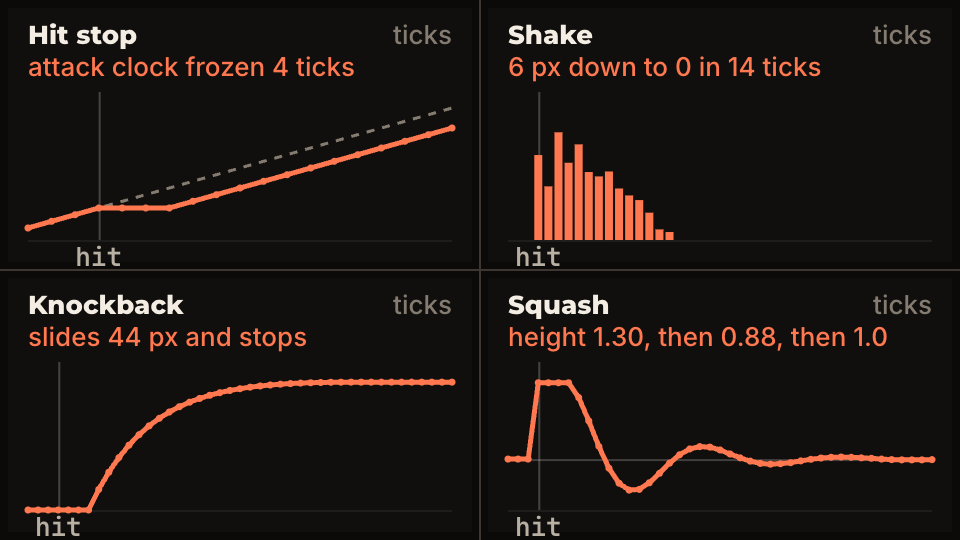
Freeze the world for about 4 ticks at 60 per second, which is 67 ms, then test 2 to 8 in your own game. The freeze lands on the exact frame where the blade touches, so the player gets one still picture of contact. That picture is what makes the hit feel heavy.
Freeze the attacker and the target together. If only the target stops, it looks like lag. Keep the shake and the UI running during the freeze: in the simulation the shake starts on the first frozen tick and carries on after it.
If two enemies are hit by one swing, take the longer freeze instead of adding them up. Two 4-tick freezes in a row read as a stutter.
The usual mistake is to set Engine.time_scale to 0. Godot's documentation says to keep it above zero, and it also slows every Timer. A counter that your characters check is simpler: if feel.stop_ticks > 0: return.
How much screen shake is enough?
Start at 6 px and let it fall in a straight line to zero over 14 ticks (233 ms). A shake that starts big and fades reads as one thump. A shake that stays the same size for half a second reads as an earthquake and hides the action.
Set Camera2D.offset instead of moving the camera node. Your follow code keeps working, and the shake cannot drift the camera away from the player.
Talks such as Juice it or lose it (GDC Europe 2012) and Jan Willem Nijman's Art of Screenshake (2013) made this kind of layering popular. Both build up one effect at a time on a plain prototype, which is the way to tune it.
What do knockback, squash and flash add?
Knockback moves the target. Give it 420 px/s on the first unfrozen tick and slow it with friction: in the run it slides 44 px and stops. It starts after the freeze, never during it.
Squash scales the target to 0.7 wide and 1.3 tall at the moment of contact, then a spring pulls it back. With a spring constant of 700 and damping of 14 it overshoots to 0.88 tall 5 ticks after the freeze ends and is within 2 percent of 1.0 about 15 ticks after it. A plain linear tween back to 1.0 works too, but it has no wobble.
The flash paints the target solid white for 4 ticks, the same length as the freeze. The white frame is the one the player sees held. In Godot this is a few lines in a shader: see hit flash, outline and dissolve shaders.
How do you build this in Godot 4?
Add the script below as a node in your level, point camera at your Camera2D, and call hit(enemy, 1.0) when damage is applied. The second argument is the direction the target is pushed: 1.0 to the right, -1.0 to the left. In your hero and enemy scripts, return early from _physics_process while stop_ticks is above zero.
The step function is separate from _physics_process so you can run it by hand. That is how the numbers on this page were made. Run in a real scene tree at 60 ticks, it gives the same values: 12.93 px of knockback and 1.15 height on the second tick after the freeze, in both.
For sparks, use a CPUParticles2D with one_shot on, explosiveness at 1, amount 14, lifetime 0.35, initial velocity 120 to 260, gravity 600 downward, and a spread wide enough to fan out. Start it on the same call as hit. More on particles in Godot 2D particle effects.
class_name HitFeel
extends Node
## Hit stop, screen shake, knockback, squash and flash for one hit.
## Everything counts physics ticks, so it replays the same way every time.

@export var stop_ticks_on_hit := 4
@export var shake_px := 6.0
@export var shake_ticks := 14
@export var knock_speed := 420.0   # px/s given to the target
@export var knock_friction := 9.0  # how fast the target slows down, per second
@export var squash_amount := Vector2(0.7, 1.3)
@export var spring := 700.0
@export var damping := 14.0
@export var flash_ticks_on_hit := 4
@export var camera: Camera2D

var target: Node2D
var stop_ticks := 0                # the game checks this and skips its own update while > 0
var flash_ticks := 0               # draw the target white while > 0
var _shake_left := 0
var _knock_vel := 0.0
var _squash_vel := Vector2.ZERO
var _rng := RandomNumberGenerator.new()


func hit(who: Node2D, dir: float) -> void:
	target = who
	stop_ticks = stop_ticks_on_hit
	_shake_left = shake_ticks
	_knock_vel = knock_speed * dir
	who.scale = squash_amount
	_squash_vel = Vector2.ZERO
	flash_ticks = flash_ticks_on_hit


func _physics_process(delta: float) -> void:
	if target:
		step(target, delta)


func step(who: Node2D, delta: float) -> void:
	# One physics tick. Runs during hit stop too: the shake must keep going.
	if _shake_left > 0:
		var size := shake_px * float(_shake_left) / shake_ticks   # straight line down to 0
		camera.offset = Vector2(_rng.randf_range(-1, 1), _rng.randf_range(-1, 1)) * size
		_shake_left -= 1
	else:
		camera.offset = Vector2.ZERO
	if flash_ticks > 0:
		flash_ticks -= 1
	if stop_ticks > 0:
		stop_ticks -= 1
		return                      # everything below waits for the freeze to end
	who.position.x += _knock_vel * delta
	_knock_vel = move_toward(_knock_vel, 0.0, absf(_knock_vel) * knock_friction * delta + 1.0)
	var pull := (Vector2.ONE - who.scale) * spring
	_squash_vel += (pull - _squash_vel * damping) * delta
	who.scale += _squash_vel * delta
How much is too much?
The test is whether the effect is over before the player needs to act again. A 14-tick freeze is 233 ms. In a game with a 5-hit combo that is more than a second of standing still. Shake of 28 px moves the floor out of the frame, and 97 px of knockback throws the enemy off the screen, so the next hit has nothing to land on.
Keep every effect behind its own exported value so you can set it to zero and compare. If you cannot say which effect a hit needs, turn them all off and add one at a time.
Add a setting for shake and flash. Some players find them hard to look at, and an option costs one if. This pairs with the input tuning in coyote time and jump buffering: both are small numbers that decide how a game feels.
How do you layer a hit sound?
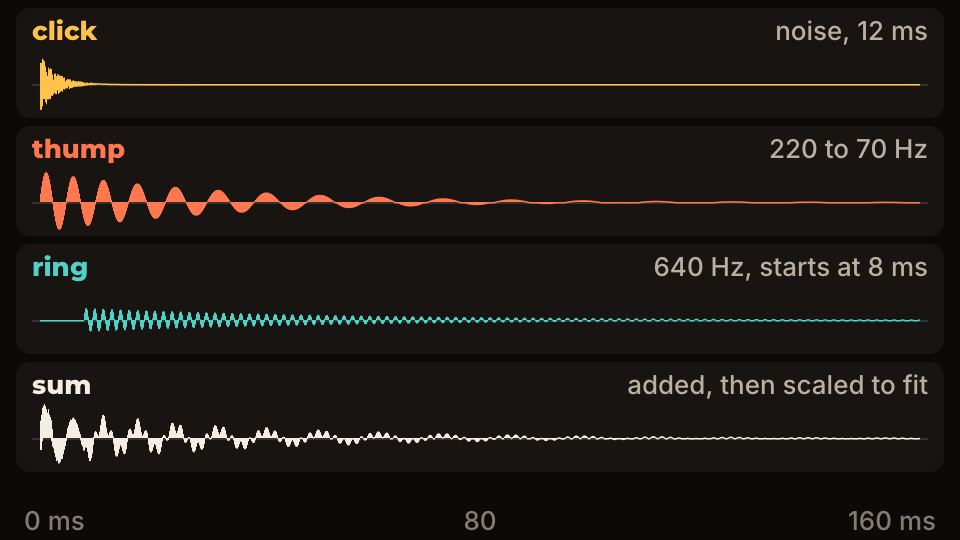
Build it from three short layers: a click, a thump and a ring. The click is 12 ms of noise. The thump is a sine that drops from 220 Hz to 70 Hz over roughly 100 ms. The ring is a 640 Hz tone that starts 8 ms late and fades over 160 ms. Added together and scaled to fit, they give a hit that has both bite and weight.
The waveform below was generated sample by sample at 44.1 kHz, so these are the real shapes of those layers. Trigger the sound on the tick the freeze starts, and vary the pitch a little on every play with pitch_scale = randf_range(0.94, 1.06) so repeated hits do not sound like a machine. Sources, licenses and mixing are covered in game sound effects on a budget.
What is the checklist for every attack?
Run this list on each new attack, one line at a time, and keep the values that survive a playtest. A guide on how to run a playtest covers how to watch for the moment a hit feels wrong.
- Hit stop: 4 ticks (67 ms) on both characters, never on the UI.
- Shake: 6 px, straight line to zero in 14 ticks, via
Camera2D.offset. - Knockback: 420 px/s after the freeze, with friction.
- Squash: 0.7 by 1.3 on contact, spring back.
- Flash: solid white for 4 ticks.
- Sparks: 14, around 0.35 s, with gravity.
- Sound: click, thump and ring, with a small pitch change on each play.
- Settings: shake and flash can be turned down.
Questions people ask
- Does hit stop work in games without combat?
- Yes. A 2 to 3 tick pause on a coin pickup, a landing or a block break gives the same sense of contact. Use smaller values than for a sword hit.
- Should hit stop use Engine.time_scale?
- It works, but it scales every timer and the docs advise keeping it above zero. A tick counter that your characters check is easier to predict and does not touch timers you did not mean to slow.
- Will shake and flash bother some players?
- They can. Add a setting that lowers or removes both, and keep each flash short. One 4-tick flash per hit is a small effect, but fast repeated hits can strobe.