Game dev guide · · 8 min read
Game sound effects and music on a budget: sources, layers, levels
Which sound licenses you can ship, how to layer a hit sound, set levels in dB and loop music without a click, with real waveforms and Godot code.
Which free game sound effects can you actually ship?
Use sounds that carry a clear license you can read on the source page: CC0 first, then Attribution (CC BY) if you are willing to credit the author. Skip anything marked NonCommercial if the game will earn money, and skip files that show no license at all.
On Freesound each sound has one of a few Creative Commons licenses. Its FAQ describes them in plain terms: CC0 lets you do almost anything, Attribution asks you to name the author, and Attribution NonCommercial forbids earning money from what you build with the sound. The same FAQ suggests a credit that lists the sound title, the author's username, a link and the license. Kenney's support page says his assets are CC0, with no credit needed.
A free sound generator is the other cheap route. sfxr is a small tool that makes retro beeps, jumps and explosions and exports WAV files. Its page gives the source code an MIT license and says nothing about the sounds it exports, so keep a note of which tool made each file.
Keep a credits.txt from the first day. Paste the title, author, link and license of every file you import, at the moment you import it. Finding thirty authors in the last week before release is the usual mistake. This is not legal advice: read the license on the page you download from, because creators can change it.

How do you make a hit sound that does not sound thin?
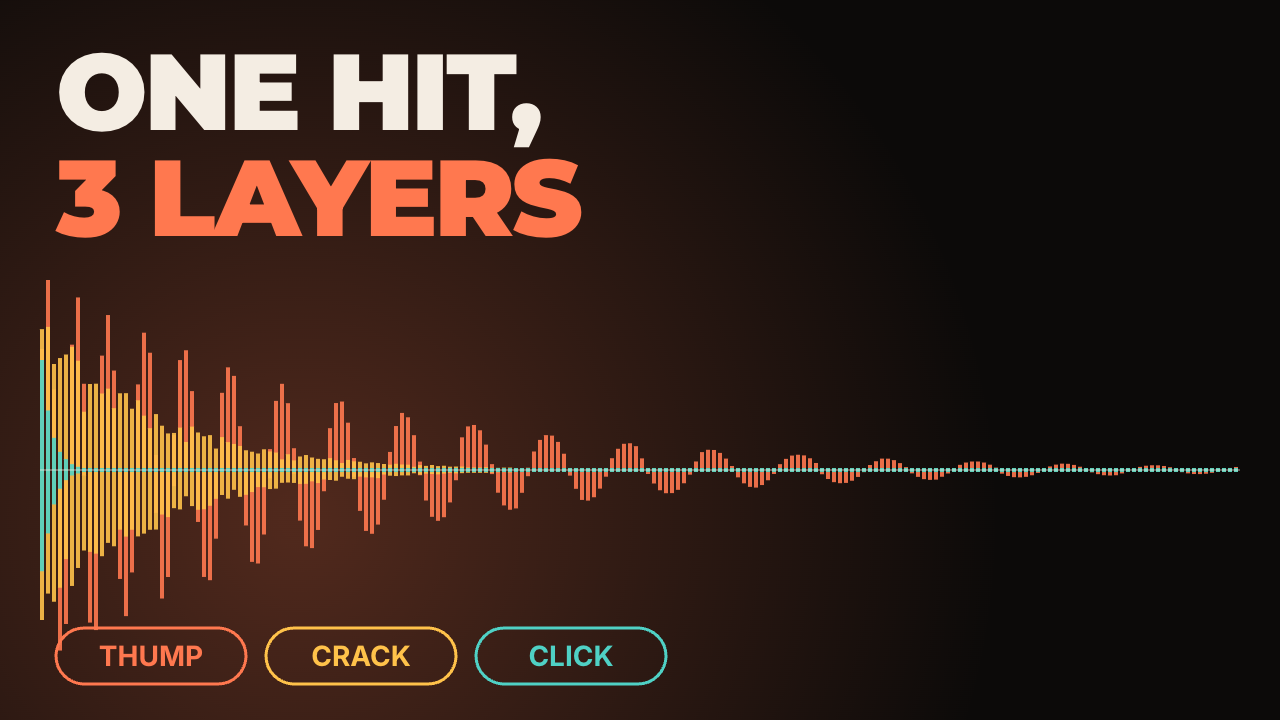
Stack three short layers instead of looking for one perfect file: a low thump for weight, a noisy crack for the body, and a click of a few milliseconds for the attack. Each layer does a job the others cannot.
The animation shows a hit I synthesized for this article, so every line you see is the real waveform. The thump is a sine wave that falls from 150 Hz to 45 Hz and fades with a time constant of 75 ms. The crack is noise with its low end removed, fading in about 28 ms. The click is a 2.6 kHz tone that lasts 2.5 ms. Every layer was first scaled to the same peak, then mixed at 1.00, 0.55 and 0.45. The sum peaks at -3.0 dBFS.
Take the same approach with recorded sounds. A real door slam gives the crack, a pitched-down kick gives the thump. Cut the layers so they all start on the same sample, because a layer that starts 20 ms late sounds like a second event.
For one effect in a fight, the game feel checklist shows where this sound sits next to hit stop, shake and flash. A layered sound with no visual response still feels weak.

How do you stop the same sound repeating?
Change the pitch a little on every play. A random pitch scale between 0.92 and 1.08 is enough to make a sword hit sound like ten different hits, and it costs one line.
The picture shows my hit at those three pitch values. Higher pitch also makes the sound shorter: 326 ms at 0.92, 300 ms at 1.00 and 278 ms at 1.08, because the file is played faster. Stay inside about 8 percent for impacts. Beyond that, a body hit starts to sound like a different object.
Do not use this trick on a sound that carries information, such as a pickup that must always sound the same, or a warning. Players learn those by pitch.
extends Node

@onready var hit_sound: AudioStreamPlayer = $HitSound

func play_hit() -> void:
	hit_sound.pitch_scale = randf_range(0.92, 1.08)
	hit_sound.play()
How loud should each sound be?
Bring every effect to the same average level first, then adjust by ear. Sounds from different sources arrive at very different volumes, and a coin that is 14 dB louder than the hit ruins the mix however good both are.
In the animation the left side shows four sounds as they might arrive from different sources. I changed the volume of three of them on purpose, by +6, -9 and +3 dB, to imitate that. Their average level (RMS, in dBFS) lands at -17.2, -3.2, -16.8 and -11.7. The coin even touches 0 dBFS and clips. On the right every sound is brought to -18 dBFS RMS, and the loudest peak is now the hit at -3.8 dBFS.
RMS is a rough guide, not what your ears hear. Short, bright sounds feel louder than their number, so a UI blip matched on paper will still need a few dB less. Broadcast uses a proper loudness measure: EBU R128 sets -23 LUFS for programmes. That target is for television, and games have no single standard, so do not copy it. Pick your own reference and keep to it.
In Godot, set levels in dB on buses, not on every player. Godot's audio bus page notes that 6 dB halves or doubles the amplitude and that the Master bus should never go above 0 dB. A common layout is Music, SFX and UI buses that send to Master, with music about 6 dB under effects so it never covers the hits. Treat that as a starting point and listen on phone speakers and headphones.
How do you loop game music without a click?
Render the loop so that sound which rings past the last beat is folded back onto the start. If you cut the file at the loop length, a note that is still sounding ends in a jump, and you hear a click every time the loop restarts.
I made a two-bar loop at 120 BPM, which is 4.0 seconds. A held note rings across the end. Cut at 4.0 s, the last sample and the first sample differ by 0.140 on a scale where 1.0 is full volume. With the tail added onto the start the difference is 0.011, which is inaudible. The ringing note now carries on from the start of the loop, as it would in a song that keeps playing.
Most music software can do this with a loop export or a render with a tail. If yours cannot, render a few extra bars, cut a perfect loop in the middle and check the seam by zooming in on it. Do the same check when you import: look at the last and first milliseconds of the waveform.
In Godot, WAV files can store loop points and you set the loop mode in the import tab. For Ogg Vorbis and MP3 you toggle Loop and give a loop offset in seconds, according to the import docs.
Which audio format should you import in Godot?
Short effects go in as WAV, music and long sounds as Ogg Vorbis. The Godot import docs explain the trade: WAV is light on the CPU and large on disk, Ogg Vorbis is much smaller and costs more CPU to play, and MP3 is bigger than Ogg at similar quality but cheaper on the CPU, which can help on mobile and web with many compressed sounds at once.
- Keep your editing source at a high sample rate and let the import step reduce it. The docs say nothing above 48 kHz is audible unless you slow the sound down at runtime, and voices can often go to 22 kHz.
- Name the file for the event, not the sound:
hit_light.wav,ui_confirm.wav. You will swap the sound later, never the event. - Play effects through a small audio manager rather than from each enemy. The signal and event bus guide shows how to send one
hitsignal that the audio manager answers.
What should you finish first when you have one afternoon?
Do the sounds the player hears most, in this order: the main action (jump, shoot, hit), the pickup or reward, the confirm and cancel in menus, and one music loop. Four categories cover most of a first build, and the rest can stay silent.
Then play the build with someone else, and watch what they react to. If they never mention the sound, it is probably fine. If they turn the volume down, a level is wrong. Our playtest guide has a script for that session, and the guide on scoping a game you can finish helps you decide what to leave silent.
Questions people ask
- Can I use CC BY sounds in a paid game?
- Yes, if you credit the author the way the license asks, for example title, username, link and license in your credits. Check the license on the specific sound, because each author picks their own.
- What format should game sound effects be?
- In Godot, WAV for short effects and Ogg Vorbis for music and long sounds. Edit from a high quality source and let the import settings lower the sample rate.
- Is -23 LUFS the right loudness for a game?
- No. -23 LUFS is the EBU R128 target for broadcast programmes. Games have no single standard, so choose a reference level for your effects and music and test on phone speakers and headphones.