Blender guide · · 6 min read
Low poly Blender workflow: model a game-ready barrel step by step
Model a low poly barrel in Blender 5.2 from a 12-sided cylinder to 346 triangles, with the vertex count after every step and a pre-export checklist.
How many polygons does a low poly game asset need?
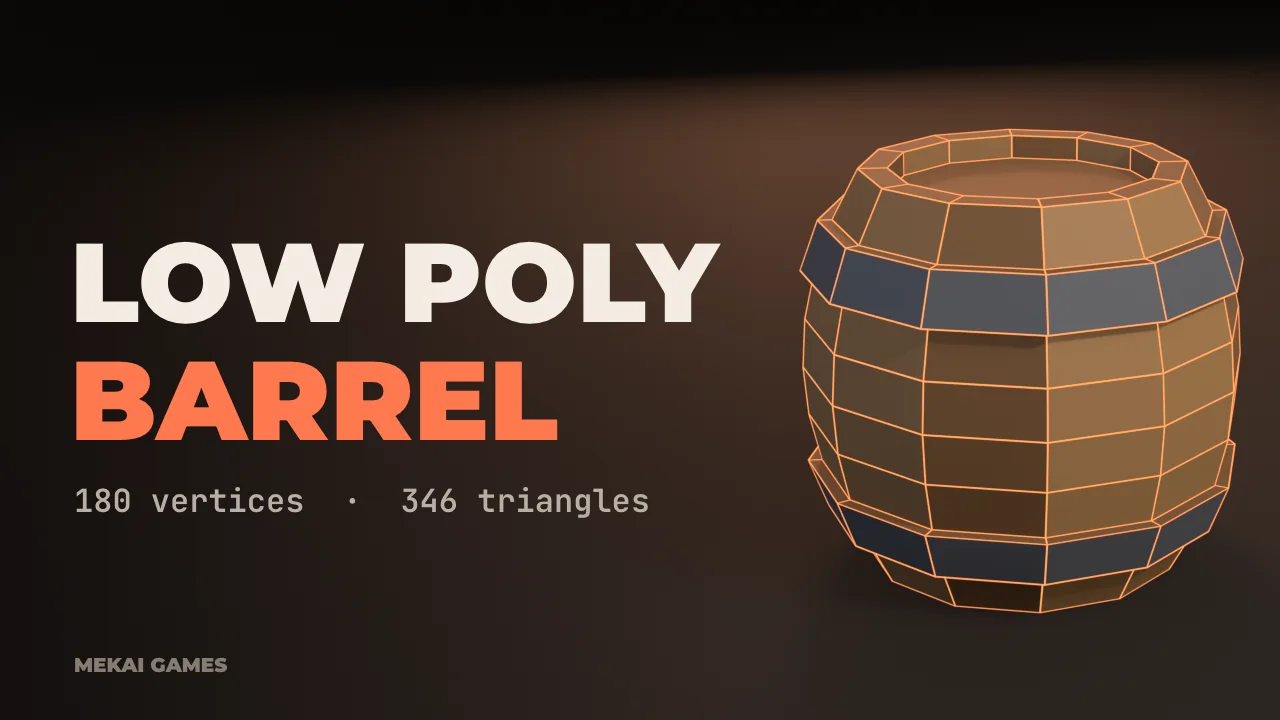
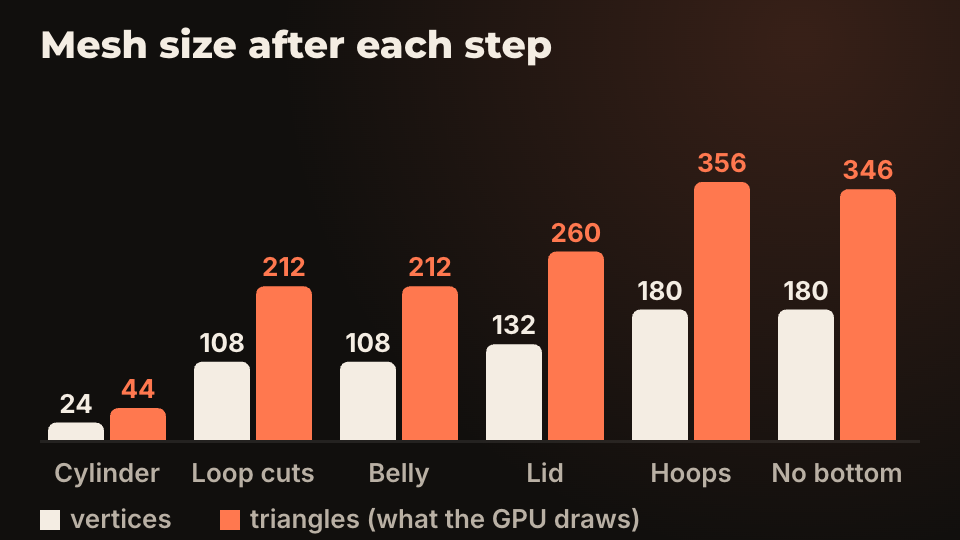
Enough to hold the silhouette the player sees, and no more. There is no magic number: the right count depends on how big the object is on screen, how many of them you draw and which device you ship on. The barrel in this guide ends at 180 vertices and 346 triangles, and every number below was read from Blender 5.2 after the step it belongs to.
The method is the same for any prop. Start with the simplest primitive that has the right outline, add an edge only when it changes the silhouette or the shading, and keep a running count. The count that matters for rendering is triangles, because that is what the GPU draws. A quad is two of them, and exporters triangulate for you.
You can see the live numbers in the 3D Viewport: turn on Statistics in the Overlays popover and it shows vertices, faces and triangles for the scene or for your selection.
How do you start a low poly model: cylinder, sides and scale
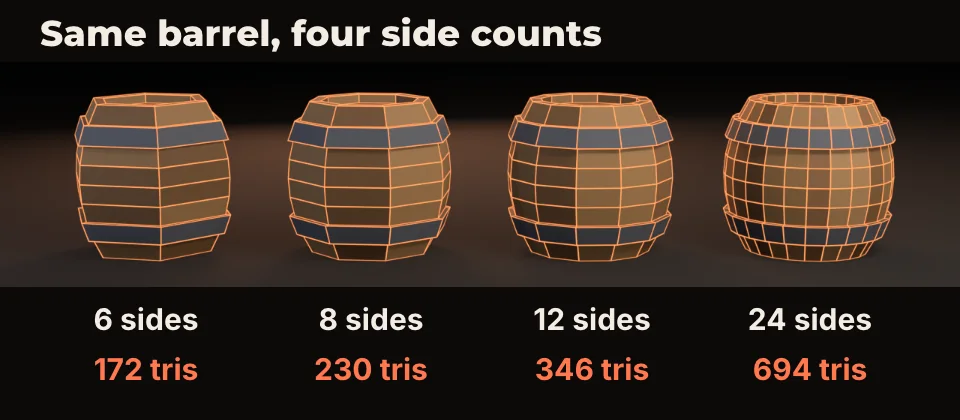
Add a cylinder, and before touching anything else decide the number of sides. In the Add Cylinder panel the field is called Vertices. Twelve gives a barrel that reads as round at close range with 346 triangles at the end. Six reads as a hexagonal drum, eight as a barrel with flats on it, 24 doubles the cost of twelve.
Model at real size. One Blender unit is one metre, and glTF and Godot keep that, so a barrel one metre tall is 1.0 in Blender and 1.0 in the engine. Fixing scale after export is where most of the later trouble comes from.
Pick the side count by judging the silhouette from the camera your game uses, not from the Blender viewport at full zoom. If the player never sees the barrel larger than 80 pixels tall, 8 sides is probably fine. If the camera gets close, spend the triangles on 12 or more.
How do you add shape without adding polygons?
Loop cuts and scaling do most of the work. With the cylinder selected, press Tab for Edit Mode, then Ctrl+R to add a loop cut, scroll to set the number of cuts and click twice to confirm. Seven cuts turned the 24-vertex cylinder into 9 rings and 108 vertices.
To bulge the belly, select a ring with Alt+click, press S, and scale it. I used a curve from 0.40 m radius at the top and bottom rings to 0.55 m at the middle, with the rings between following it. Vertex and triangle counts stay at 108 and 212, because shape came from moving vertices, not from adding them.
The mistake most people make is cutting evenly everywhere. Nine rings is more than a belly needs: five give the same curve at 60 vertices. I used nine because the hoops below sit on their own rows. If you paint the hoops instead, cut less.
Which details are worth real geometry?
Use a simple test: would the detail change the silhouette or cast a visible shadow from the play camera? If yes, model it. If it only changes colour, paint it.
The lid passed the test. Select the top face, press I to inset, then E and pull the inner face down a few centimetres to make a rim. That cost 24 vertices and 48 triangles (212 to 260).
The hoops passed too, barely. Select the two bands of faces, press E to extrude, and move them out 0.035 m. That added 48 vertices and 96 triangles, a 37 percent jump over the previous step, for two stripes. On a barrel the player sees from far away, painting them would be the better trade.
What can you delete?
Faces nobody will see. The bottom of the barrel sits on the floor, so select it and press X, then Faces. That removed 10 triangles (356 to 346) and nothing visible changed.
Do not do this when the object can move. A barrel that can be knocked over, a crate the player carries or a prop seen from a low camera needs its bottom. Check from every angle the game allows before you delete anything, and remember the mesh is no longer closed once the face is gone.
Interior faces are the other common waste, for example where two boxes overlap. Delete what is inside, or join the parts with a boolean when it is worth the cleanup.
How do you color a low poly model without textures?
Flat colour per face is enough for a stylised look and it keeps the asset to one material, which means one draw call per object. The barrel here has a single material that reads a colour attribute: each stave has its own brown, and the hoops are dark steel. The facets in the render come from flat shading.
When you need real texture detail, move to UVs. The UV unwrapping guide shows seams, checker maps and a trim sheet on this same barrel shape. Surface detail that geometry cannot carry comes from baked normal and AO maps.
I did not test the vertex colour route through Godot for this article. If you use it, check the material in the engine after import, and see the Blender to Godot export settings for what the importer does with materials.
What should you check before you export?
Run this list on every asset. It takes a minute and saves the round trip.
- Scale is applied: select the object, Ctrl+A, Scale. Dimensions in the N panel should read in metres.
- The origin sits where the object should pivot, for a barrel the centre of its base.
- No doubled vertices: in Edit Mode select all, Mesh, Clean Up, Merge by Distance. The message says how many it removed.
- Normals face outward: turn on the Face Orientation overlay. Everything should be blue.
- The triangle count is in the budget you set for this prop, read from Statistics.
- The object has a clear name. Engines and import hints read it.
Questions people ask
- How many triangles should a low poly game model have?
- It depends on screen size, object count and target device, so set a budget per asset type and measure. As a reference point from this guide, a barrel with hoops and a recessed lid is 346 triangles at 12 sides and 694 at 24.
- Should I model in quads or triangles?
- Model in quads, because loop cuts, bevels and modifiers behave better on them. The exporter triangulates on the way out, so the engine receives triangles either way.
- Does low poly mean flat shading?
- No. Flat shading is a style choice that shows the facets, and smooth shading works on low poly meshes too. Pick one per asset set so props do not clash.