
AI and game dev · · 5 min read
AI coding assistants and GDScript: common mistakes and fixes
AI writes Godot 3 code for Godot 4 projects. See the real errors in Godot 4.5.1, the bug that gives no error, and a prompt that gets working GDScript.
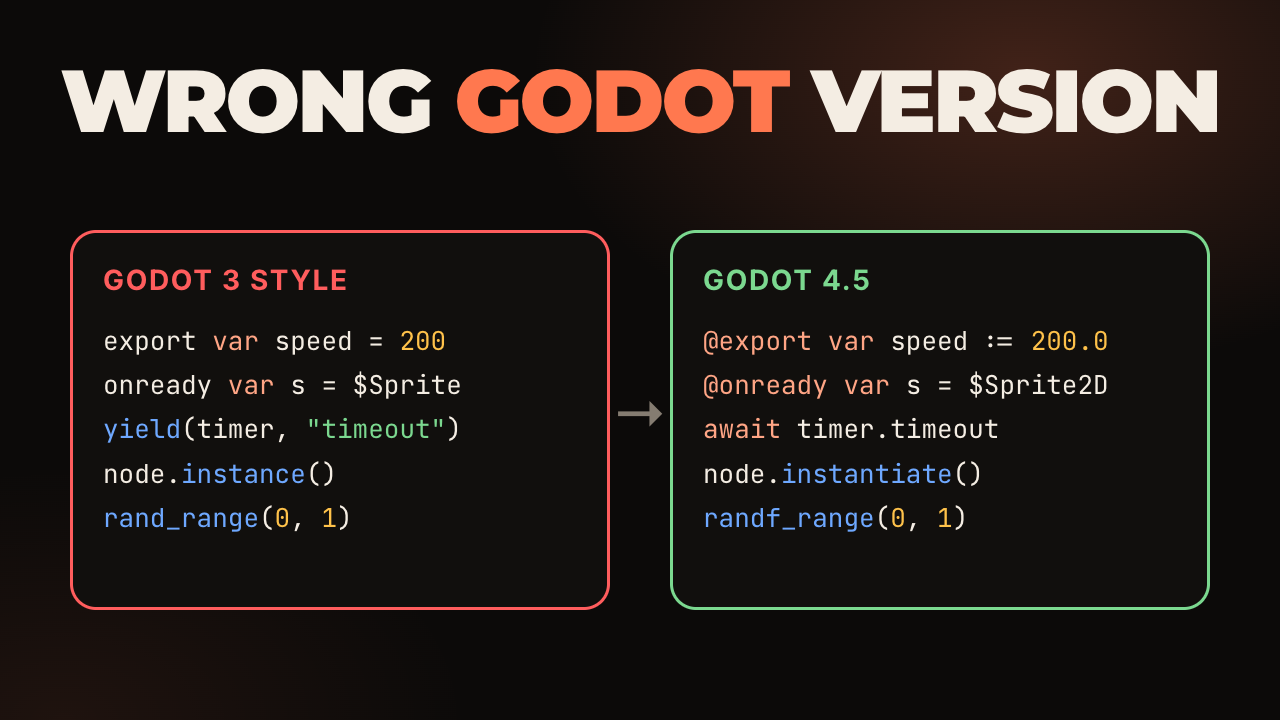
Why does AI write Godot 3 code for a Godot 4 project?
Because most of the GDScript it has read is older. Godot 3 had years of tutorials and forum answers before Godot 4 changed names, signal syntax and the physics body classes. If your request does not say which version you use, you often get Godot 3 code that looks fine and fails to load.
Every example in this guide was run in Godot 4.5.1. The errors quoted are the real messages from --check-only, and the numbers come from running the code, not from memory.
The good news is that most of these mistakes are loud. The engine refuses the script and says why. The mistakes to worry about are the ones it accepts.
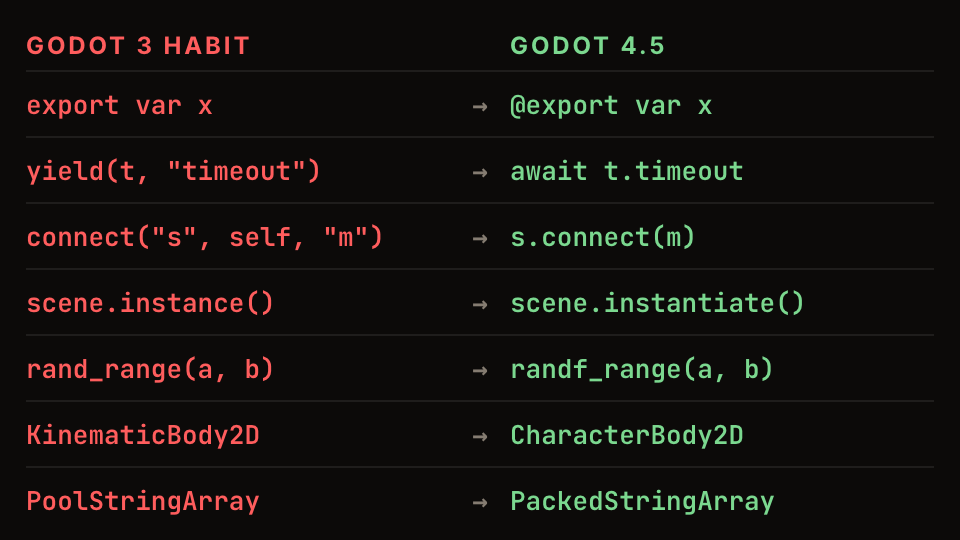
What are the most common GDScript mistakes from AI?
They fall into two groups. The first is Godot 3 leftovers: export var, onready var, yield, string based connect, .instance(), KinematicBody2D, rand_range. The second is methods that were never in any version. A request to find a child by name returned get_child_by_name(), which does not exist. The real calls are get_node_or_null() and find_child().
Here is what Godot 4.5.1 said for each one, checked with godot --headless --check-only -s file.gd. The command parses the script without running the game. Use it on any generated file before you paste it into your project.
export var speed = 200
# The "export" keyword was removed in Godot 4. Use an export annotation instead.

yield(get_tree().create_timer(1.0), "timeout")
# "yield" was removed in Godot 4. Use "await" instead.

get_child_by_name("Sprite")
# Function "get_child_by_name()" not found in base self.

move_and_slide(velocity, Vector2.UP)
# Too many arguments for "move_and_slide()" call. Expected at most 0 but received 2.

$Timer.connect("timeout", self, "_on_timer")
# Invalid argument for "connect()" function: argument 2 should be "Callable"
What is the AI mistake that gives no error?
Multiplying velocity by delta before move_and_slide(). In Godot 3 you did that. In Godot 4 move_and_slide() applies the physics step itself, and the class reference says velocity should not be multiplied by delta, or the simulation runs at the wrong speed.
The script loads and runs. In a headless test of about one second at 60 physics ticks per second, a body told to move at 200 px/s travelled 3.28 px with the delta, and 196.67 px without it. The player just moves like they are stuck in mud, and you start to look for the bug in the input code.
This is why reading generated code is not optional. The engine catches syntax. It cannot catch a line that is valid and wrong. Look at every use of delta, every await, and every place that changes state, and ask what the line does in numbers.
# Wrong: runs, moves 3.28 px in one second
velocity = Vector2.RIGHT * 200.0 * delta
move_and_slide()

# Right: moves 196.67 px
velocity = Vector2.RIGHT * 200.0
move_and_slide()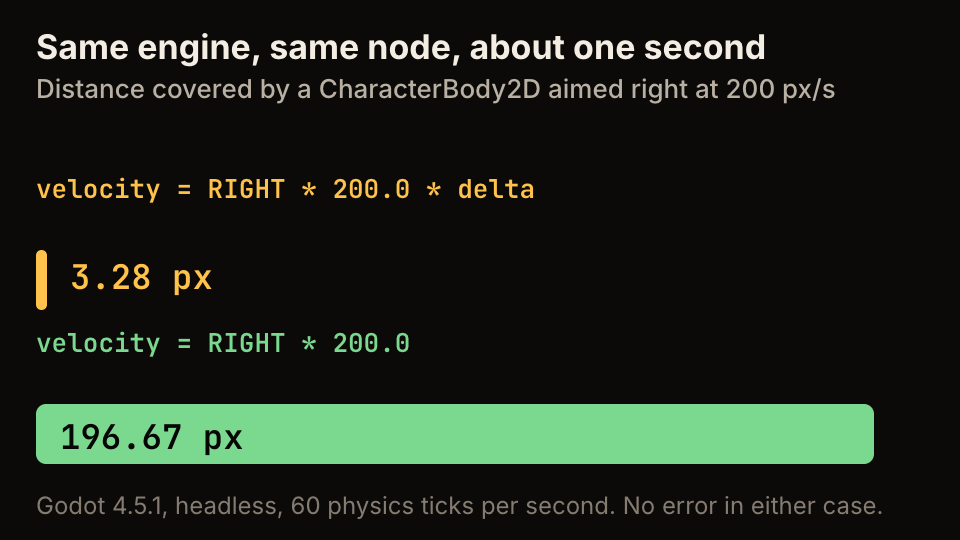
What context should you give an AI assistant?
Give it the five things it cannot guess. The engine and version, where the script lives and which child nodes exist, what you want in numbers, your current code, and the rules the code must follow. A request with all five removes most of the Godot 3 output.
The node names matter more than people expect. With $Sprite in your scene tree called Sprite2D, a generated script points at a path that is not there, and the error appears at runtime, not when you paste it.
Keep the rules in a short block that you paste into every new conversation, or into the project instructions if your tool has them. The one below is enough.
Godot 4.5.1, GDScript only. Use static types.
Use @export, @onready, await, and signal.connect(callable).
No Godot 3 API: no yield, no instance(), no KinematicBody2D.
If you are not sure a method exists in 4.5, say so
instead of guessing, and name the class docs page to check.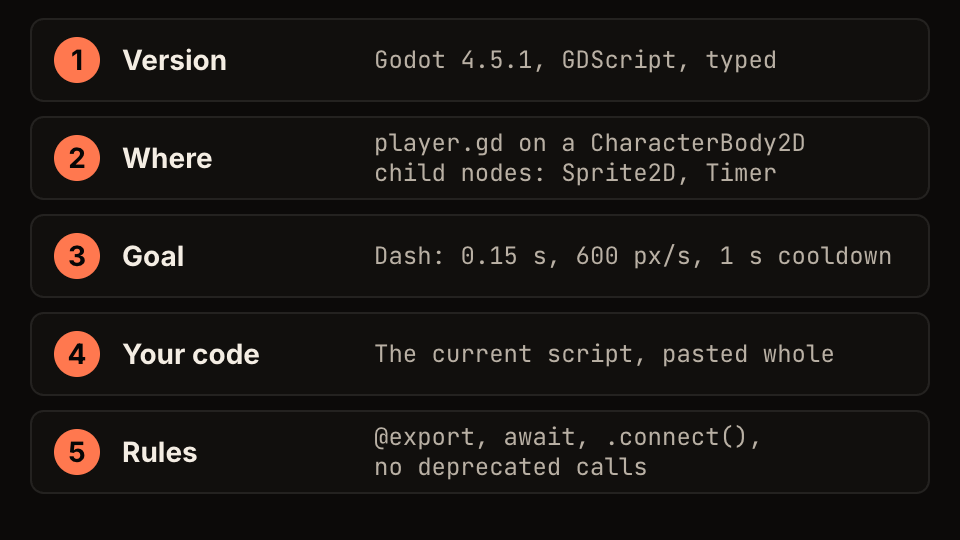
How do you review generated GDScript?
Run these steps in order. Each one is quicker than the next, so stop at the first failure.
- Parse it with
--check-only. This catches Godot 3 syntax and invented methods in seconds. - Open the class page in the docs for each method you do not know. A method name that autocompletes in your head is not proof.
- Read every line that uses
delta,await,queue_free()or a node path. - Run it with one input and check a number: a distance, a count, a duration. Print it.
- Delete anything the code does that you did not ask for. Extra helpers and extra signals are common.
When is an assistant a bad fit for GDScript?
It is a weak fit when the answer depends on things it cannot see: your scene tree, your project settings, an addon you wrote, or a bug that only shows on a phone. It will fill the gap with a guess, and the guess reads as confident as a fact.
It is also a weak fit for engine behaviour that changed recently. Anything it says about a feature added in a late 4.x release is more likely to be wrong, because there is less written about it. For those, the class reference for your exact version wins every time.
And it is a bad fit for learning the basics, if learning is the goal. Code you did not write is code you cannot debug, and the first time a generated script breaks, you will be reading it for the first time. Type the first few scripts yourself, then use the tool for the parts you already understand.
What does a correct result look like?
This dash script came out of a request with the five parts above, the dash numbers included. It passes --check-only. In a headless run with the right key held, the velocity read 600 during the dash and 200 after it, and the cooldown timer was still running at the end.
It is small enough to read in a minute, which is the point. Ask for scripts you can read in a minute, then build the bigger system from pieces you understand. If you hit a bug you cannot explain, report it with a minimal example.
For related reading, the overview of AI tools in game development covers what to hand over and what to keep. If your checks keep failing on the same thing, the cause is often missing context. If the wrong parts are mostly movement, the platformer controls guide has reference code that was tested the same way.
extends CharacterBody2D

@export var speed := 200.0
@export var dash_speed := 600.0
@export var dash_time := 0.15

var _dash_left := 0.0

@onready var cooldown: Timer = $Timer


func _ready() -> void:
	cooldown.one_shot = true
	cooldown.timeout.connect(_on_cooldown_done)


func _physics_process(delta: float) -> void:
	var dir := Input.get_vector("move_left", "move_right", "move_up", "move_down")
	if _dash_left > 0.0:
		_dash_left -= delta
		velocity = dir * dash_speed
	else:
		velocity = dir * speed
	move_and_slide()


func start_dash() -> void:
	if cooldown.is_stopped():
		_dash_left = dash_time
		cooldown.start(1.0)


func _on_cooldown_done() -> void:
	pass
Questions people ask
- Why does AI use Godot 3 syntax in my Godot 4 project?
- Much of the GDScript it learned from is for Godot 3. State the exact version, such as Godot 4.5.1, and ban the old calls by name in your request.
- How do I check AI-generated GDScript without running the game?
- Run
godot --headless --check-only -s script.gd. It parses the file and prints parse errors, which catches removed keywords and methods that do not exist. - Can AI write a whole Godot game?
- It can write pieces, but you must read, test and join them. The risk is code that loads and behaves wrongly, like velocity multiplied by delta.